Applies to: Web, iPhone/iPad, Android, Email
Who can do this: Any signed-in Owner, Admin, Contributor, or Reader. If you cannot sign in or open Letterloop, use email instead.
Open Contact Us inside Letterloop for the fastest way to give support the right product context.
From the Dashboard, select More in the left sidebar. On a narrow browser window, select Open menu (☰) first, then select More in the navigation drawer.
Select ✍ Contact Us.
In Messages, select Send us a message.
Write your message, attach a safe screenshot if it helps, and send it.
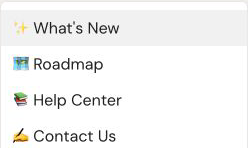
On web, open More in the sidebar and select Contact Us. The Messages window opens next.
From 🏡 Home, select the gear icon for Settings.
Under RESOURCES, select ✍ Contact Us.
Write your message, attach a safe screenshot if it helps, and send it.
Expected result: On web, Contact Us opens Messages; on iPhone/iPad and Android, it opens a new conversation. After sending, return to Messages in the support window to read replies.
Email [email protected] from the email address on your Letterloop account when possible. Say that you cannot open Letterloop, then include the details below.
The email address used for your Letterloop account
Whether you are using web, iPhone/iPad, or Android
For mobile, the app version shown under Settings → Version, if available
The Letterloop or Issue name involved
What you expected and what happened instead
The approximate date, time, and time zone
A screenshot when it helps, with unrelated personal information hidden
For billing, the provider shown on the receipt or subscription screen
Your password, authentication code, or sign-in link
Full payment-card or bank details
Another member's private account information
Active private invite, reply, or share links
For an account change, contact us from the account email when possible. For an App Store or Google Play charge, include the store and purchase date, but do not send full financial details.
On web, refresh the signed-in Dashboard and reopen More.
On iPhone/iPad or Android, update Letterloop from the public app store, reopen it, and check Settings → RESOURCES.
If Letterloop will not open, use the email option above.

