Applies to: Web, iPhone/iPad, Android
Who can do this: The signed-in Letterloop account that bought or should receive the plan. An Owner or Admin may also need to resume a Letterloop after the plan is recognized.
Reconnect the valid purchase before buying another plan.
Sign in to the Letterloop account tied to the purchase or intended mobile restore.
Find the receipt source: Paddle or Stripe for a web purchase, or the App Store or Google Play for a mobile purchase.
Confirm that the provider shows the purchase as active or completed and that the Letterloop account email is the one you expect.
For current account-level plans, confirm that the affected Letterloop is owned by the subscribed account. Older Letterloop-specific plans can remain tied to the original payer after an ownership change.
Before a mobile restore: Restoring can move subscription access to this Letterloop account and remove access from the previous Letterloop account. The destination must be an existing Letterloop account without another active plan. Restoring does not transfer Letterloop ownership or content.
Confirm that the iPhone or iPad uses the Apple Account that made the purchase.
In Letterloop, open account settings and select Subscription. If this Letterloop account is not already active, the subscription paywall opens.
Select Restore Purchases.
Wait for the status to refresh, close the paywall if it remains open, and reopen the affected Letterloop.
Confirm that Google Play uses the Google Account that made the purchase.
Sign in to the Letterloop account that should receive the plan.
When Letterloop shows Restore Subscription?, select Restore.
When Subscription Restored appears, select OK and reopen the affected Letterloop.
If the Android restore prompt does not appear: Do not buy another plan. Confirm the Google Account and Letterloop account, then use the recovery checks in Manage and restore App Store or Google Play purchases.
Sign in to Letterloop on the web and choose Subscription in the left sidebar.
Find the Subscription card. A connected plan says that your Letterloop Subscription is currently Active.
If checkout just completed but the card is not active, refresh the page once, then reopen the affected Letterloop.
If the completed purchase is still missing, contact support with the provider, purchase date, and Letterloop account email. Keep the receipt, but do not send full payment-card or banking details.
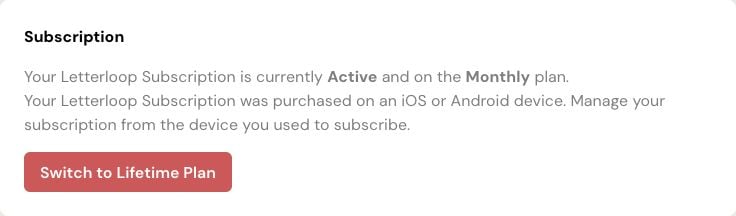
Screenshot: On web, the Subscription card says Active when the plan is connected; this example is managed from the mobile store used to subscribe.
Expected result: The signed-in account shows the plan as active, and its covered Letterloops recognize the plan without another purchase.
Paused because there was no active subscription: the Letterloop is expected to resume automatically after the restored plan reaches it. Refresh or reopen the Letterloop once.
Paused manually or because replies stopped: it stays paused. An Owner or Admin must choose Resume separately.
More than one provider appears active: do not purchase again. Ask support to investigate the duplicate plans.