

Applies to: Web, iPhone/iPad, Android
Who can do this: Contributor
Supported images
Letterloop accepts JPEG, PNG, WebP, GIF, AVIF, HEIC, and HEIF images. HEIC or HEIF photos from an iPhone may take extra time to process before all versions are ready.
Attach a photo
Open your reply for the current Issue.
Choose the media control for that question or Section. On web, its accessible label is Add photo or video. In a mobile Photo Section, the visible label is Add a Photo or Video; questions use a smaller media icon.
Choose the source shown on your platform: select a file on web; choose Choose from Library or Take Photo or Video on iPhone/iPad; or choose Choose from Library or Take Photo on Android.
Keep Letterloop open while the image uploads. Wait until the preview finishes processing; the final Share or Save control stays unavailable while uploads are still processing.
Add a caption when that Section provides one. Then choose Share Your Reply or Save Edits on web. On iPhone/iPad, choose Share Reply or Submit Edits on earlier iOS versions, or use the paper-plane send button on iOS 26. On Android, use the paper-plane send button (screen-reader label Share reply or Submit edits).
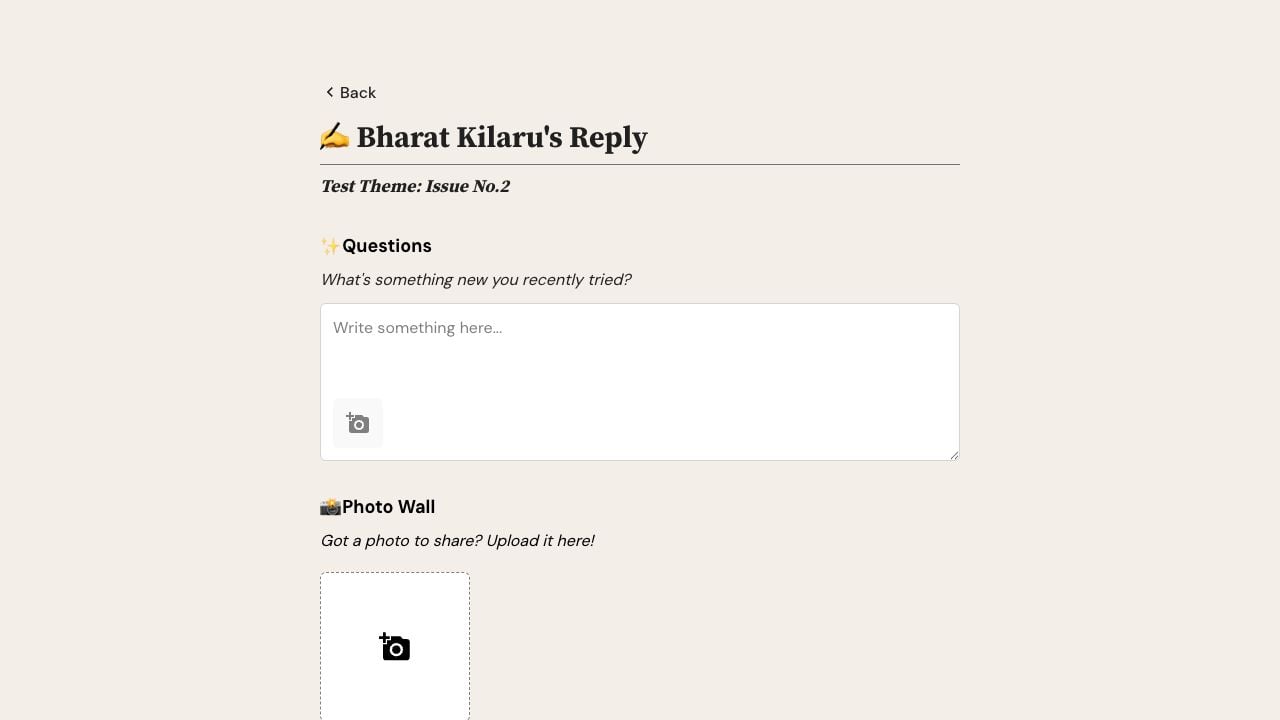
On web, select the camera icon inside a question or media-enabled Section to choose a photo or video.
How many photos can I add?
Some reply composers allow up to 10 media items. The controls and remaining slots shown on the current question or section are the source of truth. Letterloop does not publish one universal per-file size limit in this guide.
Remove or replace a photo
Use the remove control on the image, confirm when prompted, and select a replacement if needed. Wait for the replacement to finish processing before submitting. If the reply was already delivered, the live Issue can update but previously sent email and PDFs do not.
Privacy and troubleshooting
Give the browser or app permission to access the camera or photo library.
Use a reliable connection and keep Letterloop open during the upload.
Avoid attaching secrets or images that should not be seen by members or trusted share-link recipients.
If processing stalls, remove the item and retry once before contacting support.