Applies to: Web, iPhone/iPad, Android
Who can do this: Owners and Admins. Contributors can create a poll only from a question-request flow opened by an Owner or Admin. Readers cannot create polls.
Use a poll when Contributors should choose from a defined set of options. Use a normal question when you want an open written response.
Question Bank: saves the poll for reuse in future Issues. This path is available to Owners and Admins.
Upcoming Issue: adds the poll to the next Issue.
In Progress Issue: adds the poll to the live prompt set. Tell Contributors if replies are already underway.
Question-request flow: lets a Contributor add a poll after an Owner or Admin chooses Request questions from members.
Open the Letterloop, then choose Question Bank.
Choose + Add question.
On web, choose Create a poll. On iPhone/iPad or Android, choose Create poll.
Open the relevant Issue customization or question-request screen.
Choose the add-question (+) control.
On web, choose Create a poll. On iPhone/iPad or Android, choose Create poll.
Under Title, write the poll question.
Under Options, enter at least two distinct answers. Use + to add more, up to ten options.
Allow multiple answers starts on. Turn it off when each Contributor should choose exactly one answer.
Choose Asked by: Me, Anonymous, or Letterloop. On iPhone/iPad and Android, expand Additional Settings first.
Choose Save.
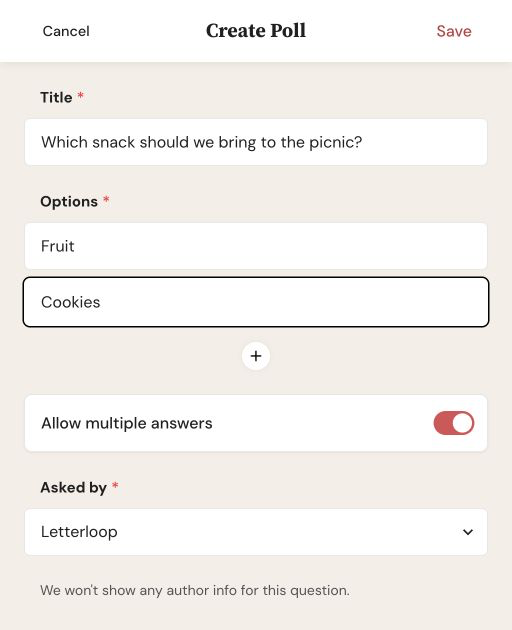
Add a title and at least two distinct options. Leave Allow multiple answers on only when Contributors may choose more than one.
Expected result: The poll appears in the Question Bank or selected Issue, depending on where you created it.
Me shows the creator's member name as the author.
Anonymous shows the poll as asked by Someone.
Letterloop presents the poll without personal author information.
Note: Question-author attribution describes who asked the poll. It does not make every Contributor's poll answer anonymous.
On web, Save stays unavailable until the poll has a title and at least two non-empty options.
On iPhone/iPad and Android, More Options Needed means fewer than two options contain text. Duplicate Options Found means two answers are the same.
If + no longer appears, the poll already has the maximum of ten options.
A poll saved only to the Question Bank is not automatically selected for the current Issue. Add it through Issue customization when it must appear now.

