Build and order the Question Bank so Letterloop can prepare the right prompts for future Issues.
Applies to: Web, iPhone/iPad, Android
Who can do this: Owner or Admin
The Question Bank is an ordered queue. When Letterloop prepares automatic suggestions for a future Issue, it takes questions from the top in the displayed order. After a custom question is used, it is not automatically added back to the bank. Letterloop’s built-in questions can return as the queue is refilled. There is no Permanent or Ask every Issue setting. To ask the same custom question in every Issue, add or keep it while customizing each Upcoming Issue, customize the live Issue if it is already In Progress, or add the question to the Question Bank again after it has been used. Questions that an Admin adds directly while customizing an Upcoming or In Progress Issue are managed with that Issue instead.
Open the Letterloop and choose Question Bank in the left sidebar.
Choose + Add question.
Choose Ask your own question, Ask a Letterloop question, or Create a poll.
Use Edit or remove beneath a question when you need to change it. Drag a question by its handle to change the suggestion order.
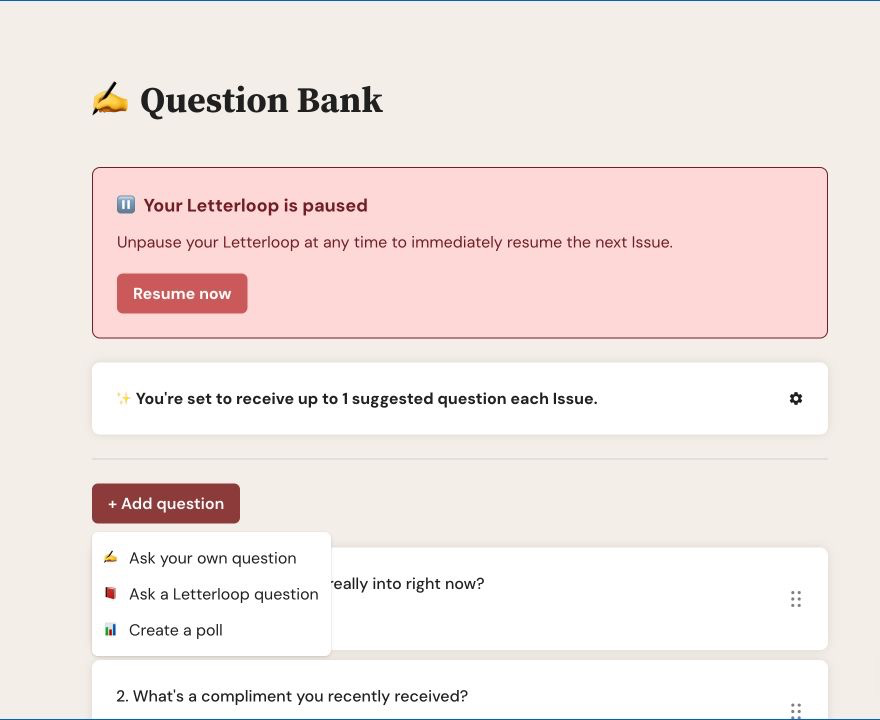
On web, choose + Add question to ask your own question, use a Letterloop question, or create a poll.
Open the Letterloop and choose Question Bank.
Choose + Add question.
Choose Add your own question, Add Letterloop question, or Create poll.
Use Edit or delete on a question. Use the up and down arrows to change its position.
Expected result: The saved question or order appears in the bank, and future automatic suggestions follow the displayed order.
Use the gear beside the suggested-question summary to choose how many questions Letterloop prepares from the bank for each Issue.
Web: Choose a number from 1 to 3 in Suggestion Settings, then choose Done. The number is saved as you change it.
iPhone/iPad and Android: Choose a number from 1 to 10 under NUMBER OF SUGGESTED QUESTIONS, then choose Save.
With Minimum questions, member-submitted questions can replace automatic suggestions as they arrive. If an Admin customized the Issue and kept an automatic suggestion, Letterloop does not replace that kept question.
Question Bank changes prepare future suggestions. They do not automatically change the prompts in an In Progress Issue. To change what Contributors currently see, customize that Issue directly.
Check the screen before editing: Changing a question in the Question Bank is different from changing its selected copy in an Upcoming or In Progress Issue.
A Question Bank must contain at least one question. If only one remains, add another question first and then remove the old one.
Remove near-duplicates.
Prefer one clear idea per question.
Mix evergreen prompts with timely ones.
Use polls for bounded choices and normal questions for open responses.
Review the order periodically so an old prompt does not surface unexpectedly.

