Applies to: Web, iPhone/iPad, Android
Who can do this: Owner or Admin
Use Theme to make your Letterloop and its Issues easy to recognize. You can choose a preset, set the header layout, and adjust images, colors, and typography.
Open the Letterloop you manage.
Select Theme.
Select Edit theme.
A preset replaces the current colors, fonts, divider style, and header design with that preset's defaults.
Selecting a preset also applies that preset's default logo and banner. Keep your original image files if you may want to restore custom images later.
If asked Switch to [preset]?, choose Switch to continue. The brief Undo action restores your previous colors, fonts, divider style, and header design, but not replaced images.
If you uploaded a custom logo or banner, the app asks Apply new theme? Choose Apply Theme to keep those custom images while applying the preset's other defaults.
Choose a preset such as Classic, Cozy, or Evening.
Under Header Design, choose Logo, Banner, Logo & Banner, or None.
Add or change the logo or banner shown by your selected header design.
Use Details to adjust the colors, typography, and dividers available in your editor.
Use the live preview to check the result. Changes save automatically; there is no separate Save button. Wait for the saving indicator to finish. On iPhone/iPad and Android, choose Done to close the editor.
Expected result: The preview reflects your choices, and the updated theme appears when the Letterloop or an Issue is opened.
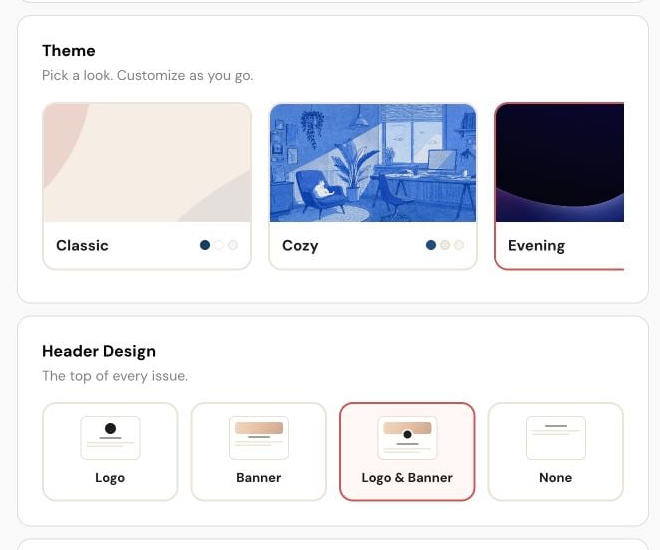
On web, choose a Theme preset, then set Header Design to Logo, Banner, Logo & Banner, or None.
Use enough contrast between text and background colors.
Choose a logo or banner that remains clear at small sizes.
Keep important words away from the edges of a banner image.
Open an Issue after a major change to confirm that its content remains easy to read.
Wait for the upload and automatic save to finish before leaving Theme.
Refresh or reopen the Letterloop if the old image remains.
Try the original file again in a supported image format.
If the editor repeatedly fails, contact Letterloop support.

