Keep the right people in your Letterloop, give each person the correct role, and remove access safely when someone leaves.
Applies to: Web, iPhone/iPad, Android
Who can do this: Owners and Admins can make changes. Contributors can view the member list, but Readers cannot open it.
Open the Letterloop and choose Members.
Review the Owner and Admin labels separately from each person’s participation role: Contributor or Reader.
Use Sort on web, or the filter-and-sort control on iPhone/iPad and Android, to find someone more quickly.
Choose + Add Member, or + Add Reader in a From You Letterloop.
Enter the person’s name and the email they will use for Letterloop.
In a Group Letterloop, choose Contributor or Reader under Invite as. From You adds every non-owner as a Reader.
Turn on Notify Letterloop members only if existing members should be told about the addition.
Choose Add Member or Add Reader, then confirm the person appears in the member list.
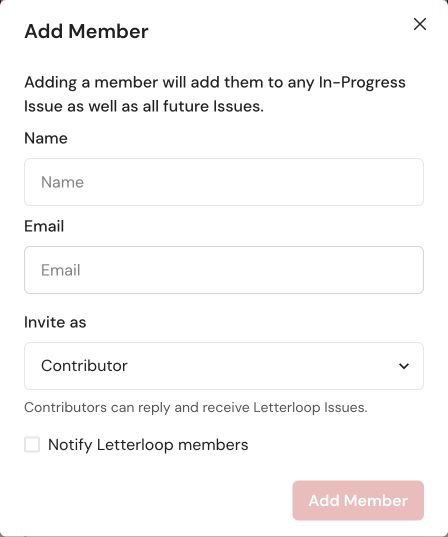
On web, Add Member asks for the person’s name, account email, participation role, and whether to notify existing members.
What happens next: A Contributor added during an In Progress Issue is added to that Issue and future Issues. A Reader receives delivered Issues but is not asked to submit replies.
On web, open the person’s Options. On iPhone/iPad or Android, open the person’s ellipsis menu.
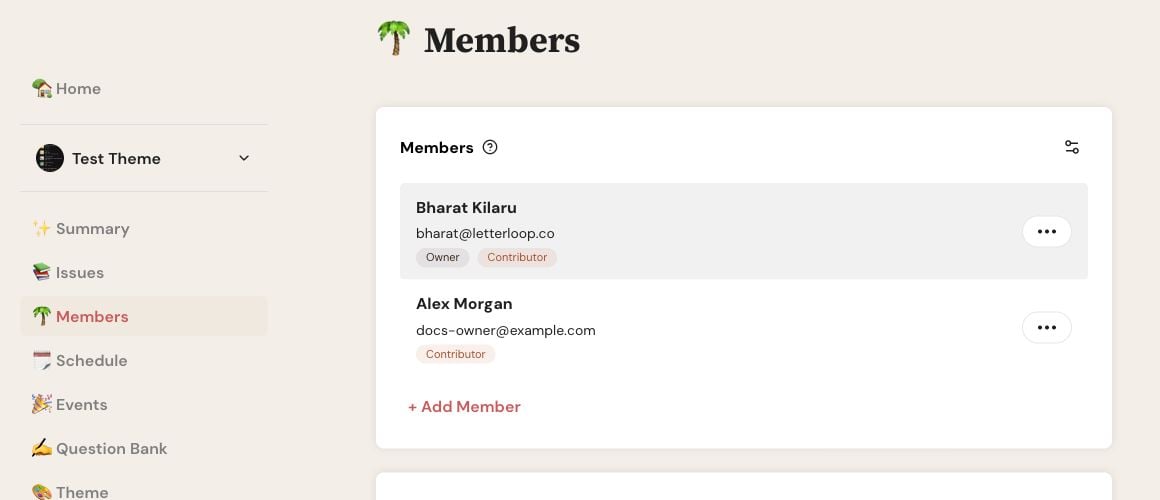
On web, open the three-dot Options button beside the person you want to update or remove.
iPhone/iPad recovery: If the ellipsis menu does not open, use Letterloop on the web for that member change. Open the same Letterloop, choose Members, then open the person’s Options. Android is not affected by this iOS issue.
Choose Edit Profile to correct the displayed name or profile photo.
In Group mode, choose Make Reader or Make Contributor.
Choose Make Admin for a trusted manager, or Make Member to remove Admin access.
Choose Resend Invitation on web or Resend Invite on iPhone/iPad and Android when the person cannot find the original email.
The current Owner can choose Make Owner to transfer ownership to another member.
Make Reader: The person stops receiving requests to reply. Replies already submitted to the current In Progress Issue remain, while saved drafts stay locked unless the person becomes a Contributor again before delivery. No member is notified about the role change.
Make Contributor: The person can contribute to the current In Progress Issue and upcoming Issues and will receive requests to reply. No member is notified about the role change.
Role limits: The Owner must remain a Contributor, and every Letterloop needs at least one Contributor. A From You Letterloop allows only its Owner to be a Contributor; switch it to Group in Settings before making someone else a Contributor.
Expected result: After the change is saved, the updated Owner, Admin, Contributor, or Reader label appears in the member list.
Removing someone ends their access and stops future Issues and reply requests. Letterloop also removes that person’s past replies from the Letterloop. Save anything the group needs before removing the member.
Open the person’s Options and choose Remove Member.
Review the consequences and select I understand that this action can't be undone.
Choose Confirm.
If the person is an Admin, choose Make Member first; then reopen Options and choose Remove Member.
Open the person’s ellipsis menu.
Verify the name carefully, then choose the destructive Remove Member action. The mobile action removes the member without a second consequence confirmation.
The Owner cannot be removed. Transfer ownership first if the current Owner needs to leave.
Expected result: The person disappears from the member list and can no longer open the Letterloop.
Check that the member-list email matches the person’s Letterloop account email.
Do not solve a missing membership by sharing another person’s account.
If a role change does not appear immediately, refresh the Letterloop or close and reopen the mobile app, then sign in again.
Contact support before recreating a member whose past replies must be preserved.

