Add people by email or a role-specific invite link, then set the welcome note new members see.
Applies to: Web, iPhone/iPad, Android
Who can do this: Owner, or an Admin who is also a Contributor. Admin Readers have limited access described below.
Members is hidden from Readers. In a From You Letterloop, every non-owner is a Reader, so only the Owner can copy invite links or add someone directly. An Admin Reader can still update Invite Note from Settings on iPhone/iPad or Android.
Add someone directly when you know their name, account email, and intended role.
Use an invite link when people should join themselves.
A Group Letterloop has separate Contributor and Reader links.
A From You Letterloop has a Reader link because only its Owner can contribute.
Open the Letterloop and choose Members.
Find Invite Links and wait for the role-specific links to load.
Read the role description, then choose Copy Link for Contributor or Reader.
Send the link directly to the intended people.
After they join, review the member list and confirm their roles.
Keep invite links private. Anyone with a link can join the Letterloop with the role encoded in that link. Do not post one publicly or forward it broadly.
If the links remain on Loading invite link... or show Unable to load invite link, refresh the screen and try again while signed in as an Owner or Admin.
The saved note appears on the join screen and in future new-member invitation emails. Changing it does not alter invitations or emails that were already sent.
Open the Letterloop and choose Members.
Find Invite Note.
Write a short welcome message that explains the group’s purpose or expectations.
Choose Save and wait for Invite note updated!
Open the Letterloop and choose Settings.
Choose Invite Note.
Write the welcome message.
Choose Save and wait for the success confirmation.
The updated note is used the next time someone joins or receives a new-member invitation.
Open Members.
Choose + Add Member for a Group Letterloop or + Add Reader for a From You Letterloop.
Enter the person’s name and account email.
In a Group Letterloop, choose Contributor or Reader under Invite as.
Turn on Notify Letterloop members only if existing members should be told about the addition.
Choose Add Member or Add Reader, then confirm the person appears in the member list.
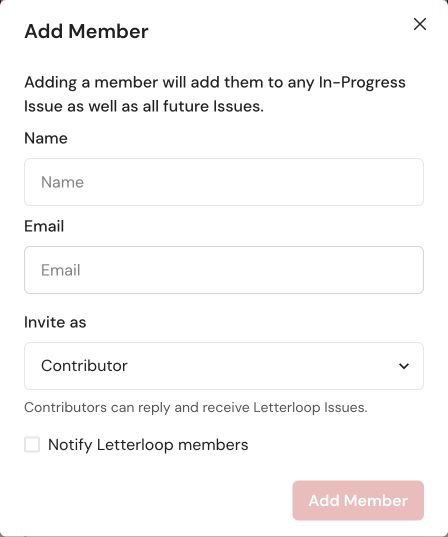
On web, use Add Member to enter a name and email, choose Contributor or Reader, and optionally notify existing members.
A Contributor is added to any In Progress Issue and future Issues. A Reader receives delivered Issues but does not submit replies.
If the form reports an invalid or duplicate email, correct the address or use the existing member record instead of adding a second one.
On web, open the member’s Options and choose Resend Invitation.
On Android, open the member’s ellipsis menu and choose Resend Invite.
On iPhone/iPad, open the member’s ellipsis menu and choose Resend Invite.
Ask the member to check spam or junk folders and confirm they are signing in with the same email shown in the member list.
iPhone/iPad recovery: If the ellipsis menu does not open, use Letterloop on the web. Open the same Letterloop, choose Members, open the person’s Options, and choose Resend Invitation. Android is not affected by this iOS issue.
Remove any unintended member promptly and contact Letterloop support with the Letterloop name and the type of invite link that was exposed. Do not paste the live link into a public support post.

