Applies to: Web, iPhone/iPad, Android
Every current person in a Letterloop is a Member. Owner and Admin describe management permission; Contributor and Reader describe participation. A roster row can therefore show Owner or Admin together with Contributor or Reader.
Owner: the one person responsible for the Letterloop. The Owner is also an Admin and must remain a Contributor. Only the Owner can transfer ownership.
Admin: a trusted Member who can help manage Issues, questions, Sections, schedules, settings, reminders, delivery actions, and—when also a Contributor—the roster. Admin permission does not by itself change whether that person replies.
Members access: on web, iPhone/iPad, and Android, a Reader cannot open Members even when that Reader is an Admin. In Group, make an Admin a Contributor if they need to manage the roster. In From You, every non-owner must remain a Reader, so only the Owner can manage Members.
Subscription coverage: Letterloop uses the Owner account's entitlement when paid Issue creation or delivery is required. Changing ownership does not move a separately purchased web, App Store, or Google Play subscription to the new Owner.
Contributor: receives the Issue reply flow and eligible reply reminders, can submit and edit responses, and receives delivered Issues.
Reader: receives and reads delivered Issues without an Issue reply form or reply reminders.
Any signed-in current Member—including a Reader—can react to delivered Issue content. Any current Member can comment when Commenting is enabled for the Letterloop.
A person opening a generic public Issue share link is not made a Member and cannot use member-only comment or reaction controls.
Group is collaborative. New Members normally join as Contributors, and an Owner or Admin can make individual Members Contributors or Readers.
From You is Owner-led. The Owner is the only Contributor; every non-owner Member, including an Admin, is a Reader.
Switch a From You Letterloop to Group before making another Member a Contributor. Switching to Group does not automatically change existing Readers.
An Owner or Admin opens the Letterloop, chooses Members, opens Options on web or the member actions menu on iPhone/iPad or Android, then chooses Make Admin, Make Member, Make Contributor, or Make Reader. Only the Owner can choose Make Owner.
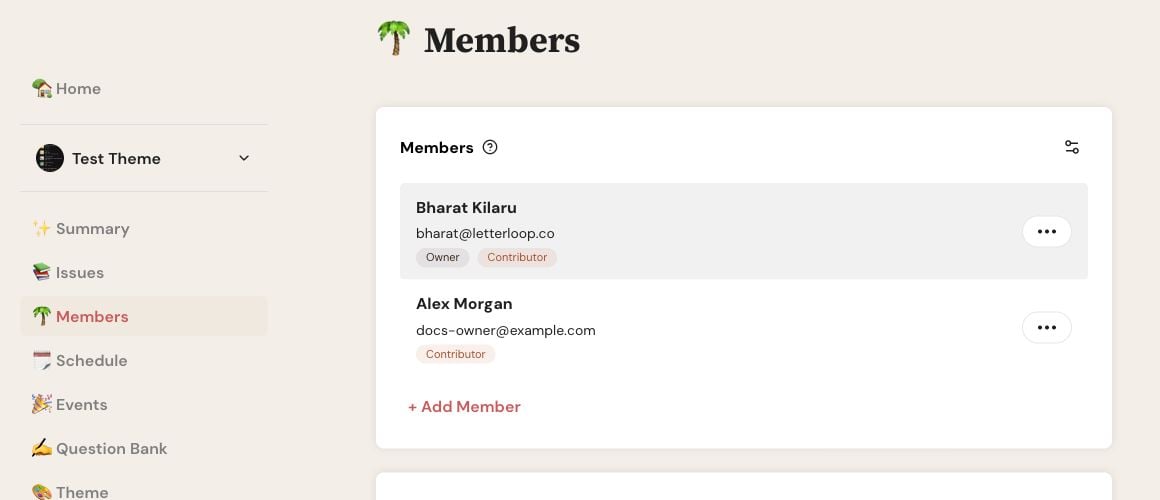
On web, choose Options beside the person whose role you want to change.
If the member actions menu does not open in the public iPhone/iPad 1.53 app, use Members on web. The menu repair is not yet in the public App Store release.
Make Admin and Make Member change management permission without changing Contributor or Reader participation. When a Reader becomes a Contributor during an active Issue, Letterloop creates a reply place and may send that person an Issue reply request. When a Contributor becomes a Reader, future reply prompts and reminders stop. Submitted replies remain in the current Issue; saved drafts stay locked and are not included unless the person becomes a Contributor again before delivery.
Note: The Owner cannot be changed to Reader, every Group Letterloop must retain at least one Contributor, and From You rejects a non-owner Contributor.

