Applies to: Web, iPhone/iPad, Android
Who can do this: Current owner
The new owner must already be a member of the Letterloop.
The owner must be a Contributor. In From You mode, ownership determines who is allowed to contribute.
Tell the new owner that they will receive owner and admin permissions.
Check subscription coverage. Future delivery is evaluated using the new owner's Letterloop account entitlement.
Native apps apply immediately: On iPhone/iPad and Android, verify the member before selecting Make Owner because there is no second confirmation.
Open the Letterloop and choose Members.
Find the intended member and verify the name and email shown in that member's row.
Open the actions for that person and choose Make Owner.
On web: Read the confirmation. If the selected row was correct, confirm the ownership change.
On iPhone/iPad or Android: The change is applied as soon as you choose Make Owner; the native apps do not show a second confirmation.
Wait for the roster to refresh and make sure the Owner label moved to the intended person.
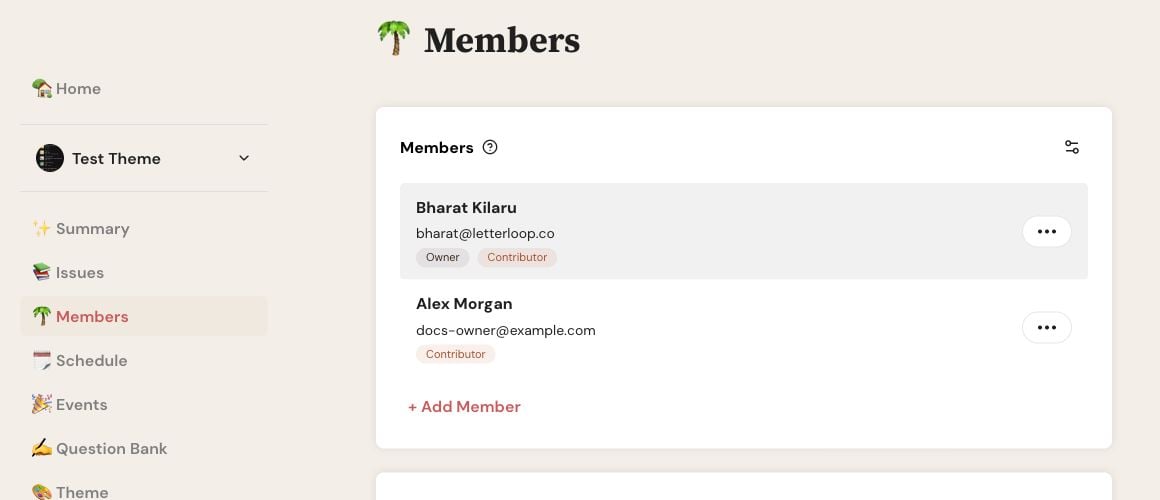
On web, open Members and select the three-dot Options button for the person who should become Owner.
The selected member becomes the Letterloop's owner, an admin, and a Contributor. The previous owner remains a member and normally retains admin access until that role is changed separately. In a From You Letterloop, Letterloop automatically makes the new owner the only Contributor and moves the previous owner to Reader; confirm that the refreshed roster shows those roles.
Making someone the owner does not move a Letterloop subscription or Lifetime purchase from one account to another. The previous owner's subscription access remains with that account. The new owner needs their own active subscription access when paid delivery is required.
Note: Do not cancel or purchase again until both people have checked their Subscription pages and purchase receipts.
If the current owner can still access the Letterloop, they can transfer ownership again from Members. Otherwise contact support with the Letterloop name and both account emails. Never send passwords or full payment details.
A web ownership transfer is all-or-nothing: if Letterloop shows Error updating owner, no partial ownership change should remain.
Refresh Members and confirm which person still has the Owner label.
Make sure you are still signed in as the current owner and that the intended member still appears with a name and email.
Retry once. If the error returns, contact support with the Letterloop name and both account emails. Do not send passwords or payment details.

