Send one manual reminder to every Contributor who still owes a reply to the current Issue.
Applies to: Web, iPhone/iPad, Android
Who can do this: Owner or Admin
Letterloop includes Contributors who have not submitted their response to the current Issue. Contributors who already submitted and all Readers are excluded automatically.
Delivery follows each recipient's settings. A manual reminder is separate from All reminders, Last reminder only, or None, but the recipient still needs Email, Push, or both enabled for reply reminders.
Open the Letterloop and choose Issues.
On the In Progress Issue, open Options and choose Send extra reminders.
In Send Reminders, choose Send Reminders.
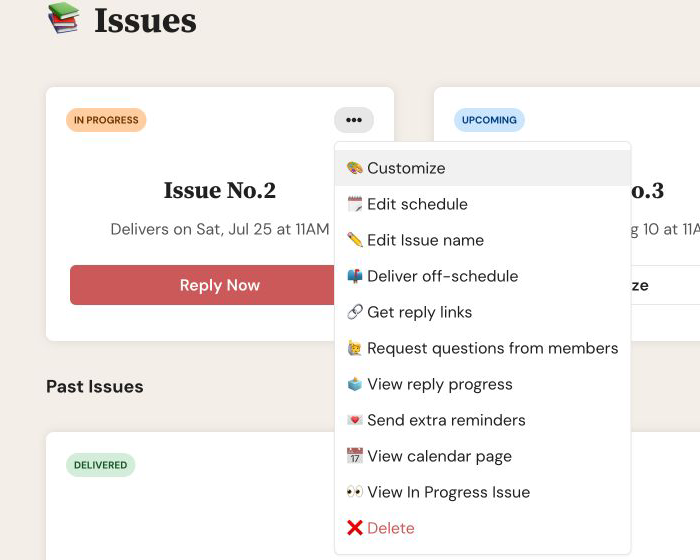
On web, open the In Progress Issue's Options menu and choose Send extra reminders.
Expected result: The confirmation closes and Reminders sent successfully appears.
From Home, open the Letterloop and choose Issues.
On the In Progress Issue, open Issue Actions and choose Send extra reminders.
Review the confirmation, then choose Send Extra Reminders Now.
Expected result: iPhone/iPad shows Reminders sent!; Android shows Extra reminders sent!
The manual reminder is queued for every eligible Contributor; you cannot choose individual recipients from this action.
Upcoming automatic reminders stay scheduled. Sending a manual reminder does not replace them.
Email and push delivery depend on each recipient's reply-reminder channel settings and device permission.
If Send extra reminders is missing, confirm that you are an Owner or Admin and that the Issue is In Progress.
Confirm that the person is still a Contributor and has not already submitted.
Ask the recipient to confirm that Email or Push is enabled for reply reminders. For push, Letterloop also needs permission in iPhone/iPad or Android Settings.
For email, check spam and promotions folders and confirm that the member email matches the account they use.
Do not select the send action repeatedly while it is processing. If delivery still fails, contact Letterloop support with the Letterloop name, recipient email, and approximate send time.

