Applies to: Web, iPhone/iPad, Android
Who can do this: Owner or Admin
See which Contributors have replied to an In Progress Issue, then decide whether anyone needs an extra reminder.
Reply progress compares the Contributors expected to reply with the Contributors who have submitted. Readers do not owe a reply and are not included in reminders. On Android, Reply Progress can also list Readers with an outstanding mark. A member whose role changed after the Issue started can remain on the list on any platform.
Open the Letterloop and select Issues.
Find the In Progress Issue and open Options.
Select View reply progress.
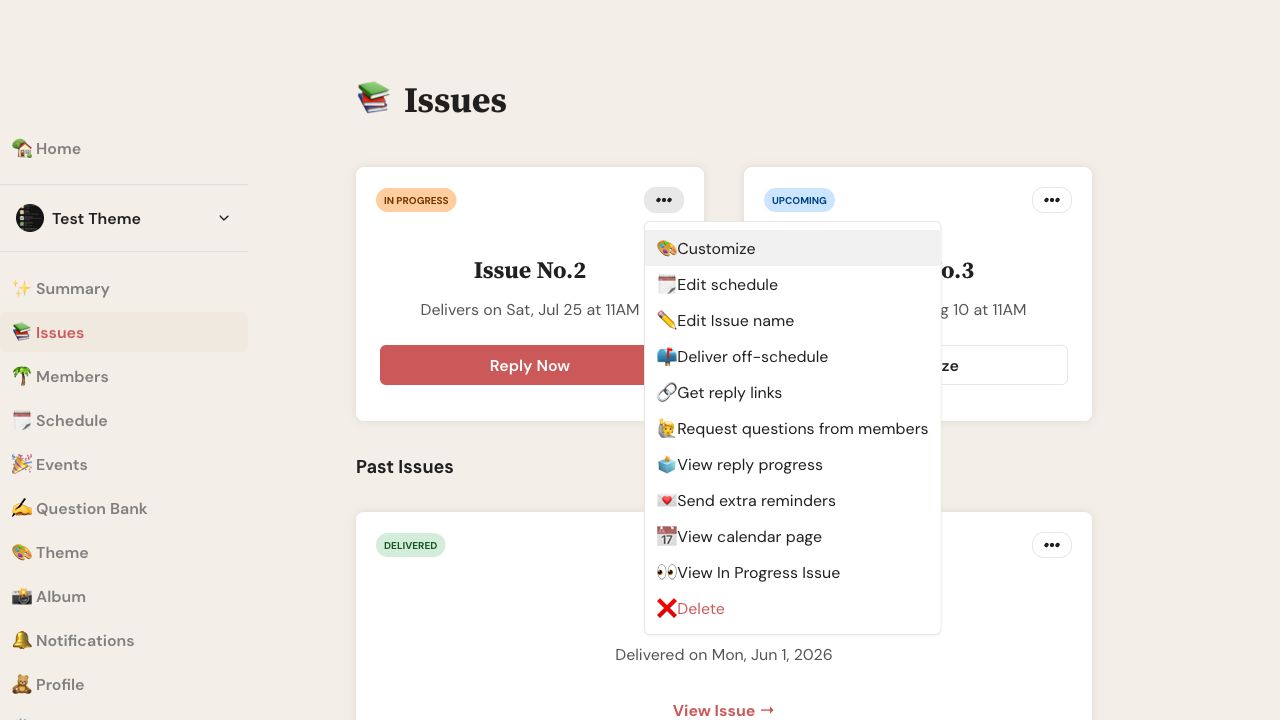
Open the In Progress Issue's Options menu and select View reply progress.
Open the Letterloop and select Issues.
On the In Progress Issue, open the ellipsis (•••) or Issue Actions menu.
Select View reply progress.
Expected result: Letterloop opens Reply Completion on web or Reply Progress on iPhone, iPad, and Android. Each expected Contributor appears with a replied check or an outstanding mark.
Check the Delivery Date before sending another reminder.
Letterloop automatically schedules reminders three, two, and one day before delivery for eligible outstanding Contributors, according to their notification preferences.
When another reminder is useful, return to the In Progress Issue actions and select Send extra reminders. The action targets Contributors who have not submitted; email and push delivery still follow each person's channel preferences.
A replied status tells you that a Contributor submitted. View In Progress Issue is a separate Owner/Admin action that can reveal saved replies before the group sees them together. Use it only when administration or curation requires it.
Refresh or reopen the Issue after a recent submission.
Check whether the member is a Contributor or Reader.
Confirm that the person submitted from the same membership and account.
Check whether an Admin changed the member's role after the Issue started.
If the mismatch remains, contact support with the Letterloop, Issue number, member, and approximate submission time.

