Applies to: Web, iPhone/iPad, Android
Who can do this: The Owner or any current Admin
Use the Schedule page to set the recurring rhythm for future Issues, change one upcoming or in-progress Issue, and see when contributors can reply.
Frequency sets the cadence, delivery day, and delivery time for future Issues.
Reply window is the time between an Issue starting and being delivered. Current schedule options give contributors seven days to reply automatically; there is no separate reply-window setting.
Start Date changes when one upcoming Issue opens for replies.
Delivery Date changes the deadline and planned delivery point for one in-progress Issue.
Open the Letterloop you want to manage.
Select Schedule in the left sidebar.
Open the Letterloop.
Select Schedule.
On the Schedule page, find Frequency.
Choose Deliver my Letterloop: Weekly, Monthly, or Quarterly.
Use Every, On this day, and At this time to finish the cadence.
Select Save. On web, review the confirmation and select Change Frequency.
Expected result: Letterloop confirms that the frequency was updated. The new frequency starts after the already scheduled Upcoming Issue; it does not change that Issue or a live Issue.
Weekly: every 2 through 12 weeks.
Monthly: every 1 through 12 months.
Quarterly: every 1 through 4 quarters.
Note: Once-a-week automatic delivery is not currently available in Schedule. The shortest recurring option is every 2 weeks.
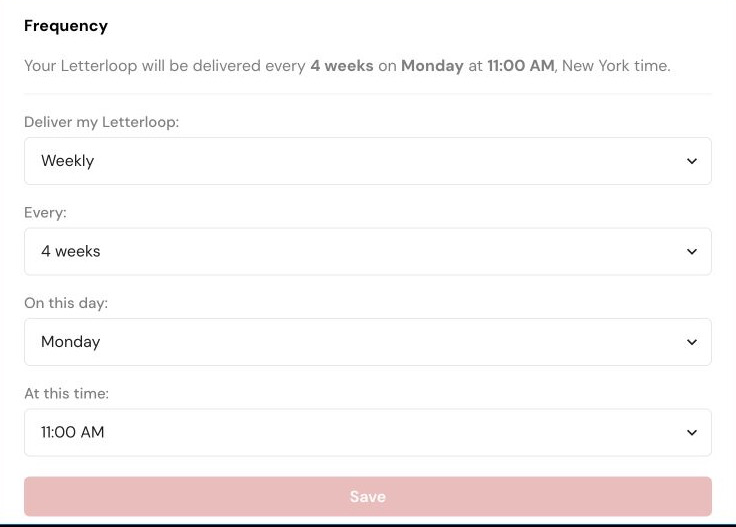
Frequency settings on web. Choose the cadence, interval, day, and time, then select Save.
On the Schedule page, find the UPCOMING or IN PROGRESS Issue.
Select Edit Schedule.
For an Upcoming Issue, change its Start Date or Time of Day. Letterloop keeps the automatic seven-day reply window and calculates the delivery date.
For an In Progress Issue, change its Delivery Date or Time of Day.
Select Save for the setting you changed.
Expected result: The Issue card shows the new date or time. Changing an in-progress Delivery Date also checks the Upcoming Issue against your recurring frequency.
Letterloop keeps the existing Upcoming Issue date when the edited live deadline still leaves enough space before the next Issue starts.
If the change would make the Upcoming Issue start too soon, Letterloop moves that Issue forward by one or more whole frequency cycles until the required spacing is available. The Upcoming Issue is not moved backward.
If you shorten the deadline, review reply progress and tell contributors that they have less time.
If you extend the deadline, check the Upcoming Issue afterward because it may move forward to prevent overlap.
Automatic reminders use the Issue's actual deadline. A date change can alter which reminder checkpoints still apply.
Schedule times are shown in your local time zone. If your area changes clocks for Daylight Saving Time, review At this time.
An in-progress Delivery Date must be at least one day from now.
An Upcoming Start Date must be at least one day from now and, when an Issue is in progress, at least one day after it.
If controls are read-only, ask the Letterloop Owner or an Admin to make the change.
If Letterloop says the Issue is no longer in progress or has already been delivered, return to the Issues list and refresh. A delivered Issue's schedule cannot be changed.
After saving, return to Schedule and confirm the Upcoming and In Progress cards show the expected dates.

