Start the prepared Upcoming Issue immediately instead of waiting for its scheduled start.
Applies to: Web, iPhone/iPad, Android
Who can do this: Owner or Admin
Review the selected questions, polls, Sections, and events.
Confirm the Contributor and Reader roles for the people in this Issue.
Check the scheduled delivery date. Starting early does not change it.
Make sure the Letterloop is active and its subscription allows another Issue when required.
Open the Letterloop and choose Issues.
On the Upcoming Issue card, choose Options (•••).
Choose 🏁 Start now.
In 🏁 Start Issue Now, review the Issue number and delivery date, then choose Start Now.
Wait for the page to refresh. The new Issue appears as In Progress.
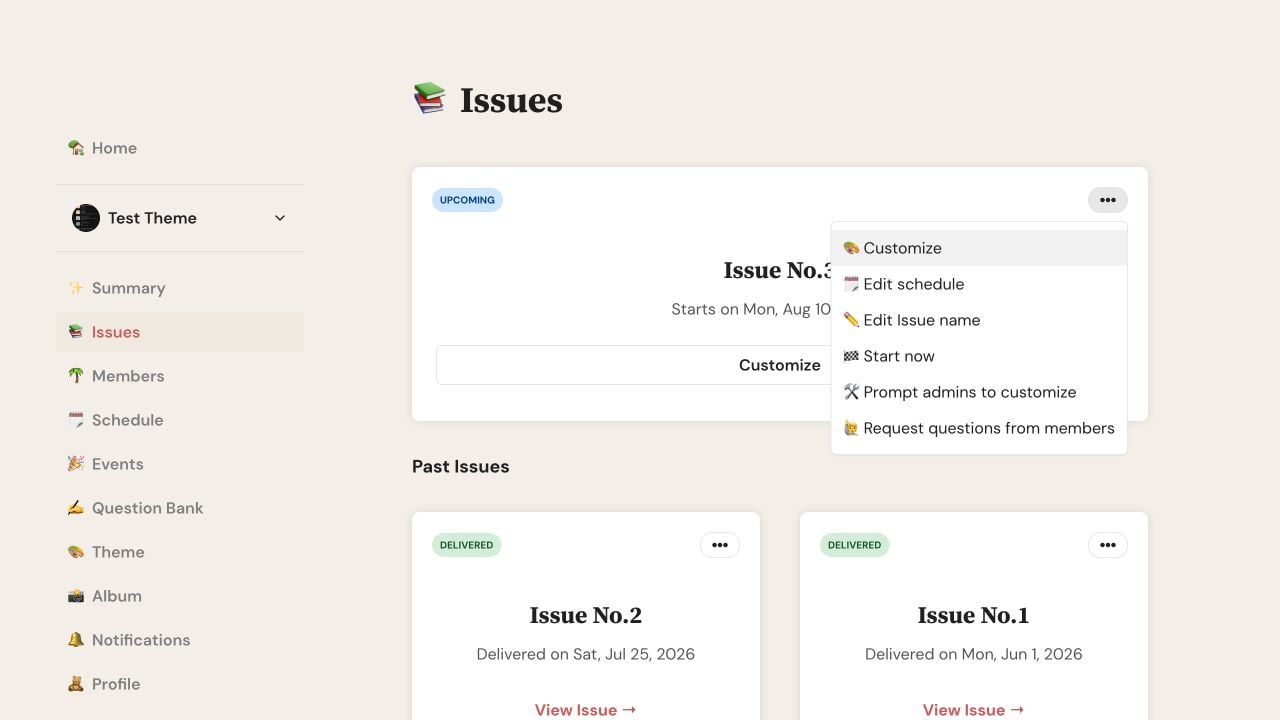
On the Upcoming Issue card, open Options and choose Start now.
Open the Letterloop and choose Issues.
On the Upcoming Issue card, tap the ellipsis to open Issue Actions.
Tap 🏁 Start now.
Review the delivery date, then tap Start Now.
Wait for the confirmation. The new Issue appears as In Progress.
This alternate path is the same on web, iPhone/iPad, and Android.
Open the Letterloop and choose Schedule.
On the Upcoming Issue card, choose Edit Schedule.
Under More Actions, choose Start now.
Review the delivery date, then choose Start Now.
The delivery date stays unchanged. You can edit it after the Issue starts.
Letterloop copies the prepared questions, polls, Sections, and events into the new Issue.
Contributors receive reply prompts; Readers can read the delivered Issue but do not get reply records.
The next Upcoming Issue advances according to the Letterloop schedule.
Letterloop prevents another start while an Issue is already In Progress.
If an Issue is already In Progress, deliver or delete it before starting another one.
If the Letterloop is paused, reactivate it first.
After two delivered Issues, confirm that the Owner has an active paid subscription.
Confirm that you are signed in as the Owner or an Admin.
Refresh the Issues page before trying again.
If no Contributor submits a reply by delivery, Letterloop deletes the empty Issue and pauses the Letterloop. Reactivate it when the group is ready to take part.

