Applies to: Web, iPhone/iPad, Android
Who can do this: The account holder whose subscription is billed
Manage or cancel a recurring Letterloop plan through the provider that bills you. A Lifetime purchase has no recurring renewal to cancel.
Open Subscription in Letterloop. On the web, use the sidebar. On iPhone, iPad, or Android, open account settings and select Subscription.
Check the controls or message beneath your plan. They identify whether the plan is billed through letterloop.co, the Apple App Store, or Google Play.
Use that same provider to manage renewal. Pausing a Letterloop or deleting the app does not cancel a subscription.
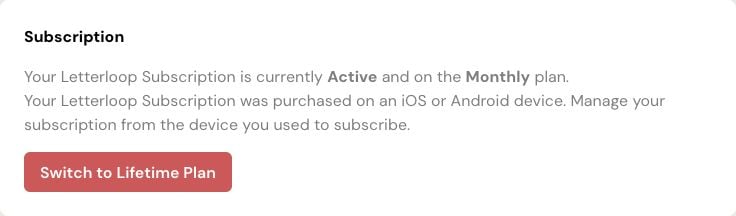
Screenshot: This web Subscription card identifies a mobile-billed plan. Manage renewal in the App Store or Google Play account used to subscribe.
On the web Subscription page, select Show Advanced Options.
Select Cancel Subscription.
Select No, Continue to Cancel, review the access-through date, then select Yes, Cancel at Period End.
Expected result: Letterloop shows Cancellation Scheduled. Your plan stays active through the date shown and will not renew.
On the web Subscription page, select Manage Subscription.
On the billing page that opens, select the cancellation option and follow the confirmation steps.
Expected result: The billing page confirms the cancellation and shows when paid access ends.
In Letterloop, open account settings, select Subscription, then Manage Subscription.
Or open iPhone or iPad Settings → your name → Subscriptions → Letterloop.
Select Cancel Subscription and follow Apple's confirmation.
If Apple shows no Cancel Subscription button or shows an expiration message in red, the subscription is already canceled.
In Letterloop, open account settings, select Subscription, then Manage Subscription.
Or open Google Play → Payments & subscriptions → Subscriptions → Letterloop.
Select Cancel subscription and follow the instructions.
Expected result: Google Play confirms the cancellation and shows the remaining paid-access period.
Web shortcut: https://app.letterloop.co/subscription
If the web page says the plan was purchased on iOS or Android, manage it in that device's store; the web page cannot cancel it.
For App Store billing, sign in with the Apple Account used on the receipt.
For Google Play billing, switch to the Google Account used to subscribe.
For a web-billed plan, confirm you are signed in to the Letterloop account that made the purchase.
If renewal still appears active after you complete the provider's flow, contact Letterloop support with the provider name and a non-sensitive screenshot of the status. Do not include full card or bank details.
Cancellation stops future renewal through the billing provider. You keep paid access until the end date the provider shows. Cancellation does not delete your account, Letterloops, delivered Issues, or saved data.

