Applies to: Web, iPhone/iPad, Android
Who can do this: Any signed-in account that is no longer a member of a Letterloop
Account deletion is permanent. It removes your Letterloop account profile and sign-in account. It does not delete Letterloops or cancel subscriptions; complete those steps separately before deleting your account.
Cancel any recurring subscription where you bought it. Deleting the account does not cancel a Letterloop subscription billed through Letterloop on the web, the App Store, or Google Play.
Transfer ownership of each Letterloop that another person should keep, or delete the Letterloop if it should not remain.
Leave every Letterloop you belong to. Deletion is blocked while any membership is still connected to the account email.
Save any delivered Issues or PDFs you want to retain.
Make sure you are signed in to the account you intend to delete.
From the Dashboard, choose More, then Account.
Scroll to Delete Account and choose Delete Account.
Review the Delete Account dialog. Choose Cancel to stop, or choose Delete Account to permanently delete the account.
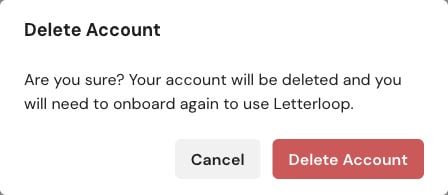
Web: Review the warning, then choose Delete Account only when you are ready. Cancel closes the dialog without deleting anything.
Important: The current mobile apps do not show a second confirmation. Tapping Delete Account immediately submits the permanent deletion request.
From Home, tap the gear icon to open Settings.
Under ACCOUNT, choose Account.
Scroll to Delete Account.
Only when you are ready, tap Delete Account once. Do not tap it just to preview the next step.
When deletion succeeds, Letterloop removes your account profile and sign-in account, then signs you out. To use Letterloop again, you must create and onboard an account again; this does not restore the deleted account.
Letterloop blocks deletion whenever a current member record still uses the account email.
Return to Home and leave every Letterloop. If you own one, transfer ownership before leaving, or delete the Letterloop if it should not remain.
If the Dashboard looks empty, sign out and back in to refresh the membership list, then check again.
Retry account deletion once after every membership is removed.
If it is still blocked, use Contact Us in Letterloop or email [email protected]. Include the account email, but never send your password or payment-card details.

