Applies to: Web, iPhone/iPad, Android
Who can do this: The subscriber using the web account, Apple Account, or Google Account that made the purchase
Update the payment method with the provider that bills your Letterloop subscription. Letterloop does not store or replace payment details managed by another provider. A Lifetime purchase has no recurring renewal payment method to update.
Open Subscription in Letterloop. On the web, use the sidebar. On iPhone, iPad, or Android, open account settings and choose Subscription.
Check the plan card. The controls or the Managed via line identify letterloop.co, the Apple App Store, or Google Play. On the web, a mobile-billed plan may be summarized as purchased on iOS or Android.
Use that same provider to update the payment method.
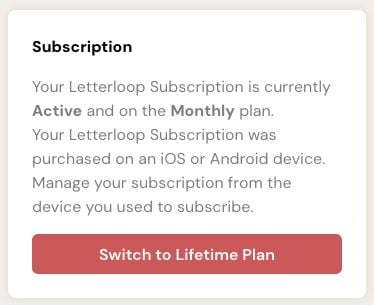
On the web Subscription page, this message means the recurring payment method is managed by the App Store or Google Play—not by Letterloop.
Open Subscription in Letterloop on the web.
Choose the payment-management button shown: Update Payment Method or Manage Subscription.
Update the eligible payment method in the secure billing page that opens.
Expected result: The billing provider confirms the saved payment method. Return to Letterloop and refresh the Subscription page if the status does not update immediately.
Confirm that Letterloop shows Managed via Apple App Store.
Open iPhone or iPad Settings → your name → Payment & Shipping.
Tap the existing payment method and choose Edit, or choose Add Payment Method.
Save the change with the Apple Account that purchased Letterloop.
Confirm that Letterloop shows Managed via Google Play.
In Google Play, open Payments & subscriptions → Subscriptions → Letterloop.
Choose Manage → Update.
Follow Google Play's instructions to select or add the payment method.
Make sure you are signed in to the Apple Account, Google Account, or Letterloop web account that made the purchase.
If the active mobile purchase is not recognized in Letterloop, use Restore Purchases. Restoring reconnects the purchase; it does not change its payment method.
Do not buy another plan just to change a payment method, because that can create duplicate subscriptions.
Contact support with the provider name and a non-sensitive screenshot of the status. Never send full card, bank, or payment credentials.

