Applies to: Web, iPhone/iPad, Android
Who can do this: An Owner or Admin can pause or resume a Letterloop. The account that bought the plan manages its billing.
If your plan is still renewing, the Letterloop—not the subscription—is probably paused. They are separate controls.
Letterloop paused: Issue creation stops for that Letterloop, but its recurring subscription stays active and can continue charging.
Subscription paused: An eligible recurring web plan stops billing. The plan is no longer active in Letterloop until it is resumed, so owned Letterloops can pause when they next require the subscription.
On web, choose Subscription in the sidebar (on smaller screens, open the menu first). The Subscription card shows whether the plan is Active or Paused, where it was purchased, and which billing controls are available.
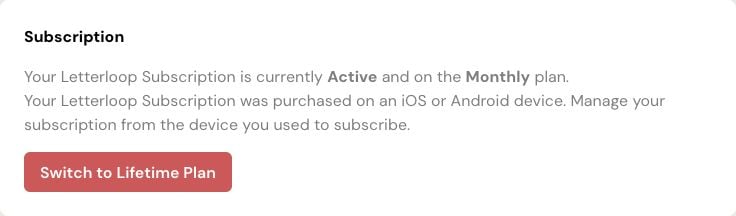
Use the Subscription card to identify the plan status and provider before changing billing. This example is managed through the mobile store used to subscribe.
Deletes any Issue in progress.
Prevents creation of future Issues.
Keeps delivered Issue history and Letterloop settings.
Affects only the Letterloop you pause.
Creates a new Issue immediately when an Owner or Admin resumes the Letterloop, with delivery scheduled after the Letterloop’s current number of days to reply.
Does not change the subscription or its renewal date.
Expected result: The Letterloop shows as paused, while the Subscription card remains Active unless the plan itself is paused or canceled.
This option appears on web only when your active recurring plan supports pausing. It does not appear for Lifetime, App Store, or Google Play purchases. Some older web plans instead show Manage Subscription.
On web, choose Subscription in the sidebar (on smaller screens, open the menu first).
Select Show Advanced Options.
Select Pause Subscription.
Review Pause Subscription?, then select Yes, Pause Subscription.
Expected result: The card says Subscription Paused and shows Resume Subscription. That plan is not billed while it remains paused. Letterloops that require the plan may be unavailable or paused until it is resumed.
Before resuming: Selecting Resume Subscription starts a new billing period and charges the full plan amount immediately.
Open the Subscription page and note which controls Letterloop shows: direct controls, Manage Subscription, or device/store guidance.
If Show Advanced Options appears, select it, then Cancel Subscription. If Manage Subscription appears, open it and cancel renewal in the billing portal.
For an App Store or Google Play purchase, manage the subscription with the store account that made the purchase.
Review the provider confirmation and the date through which access continues.
Expected result: The provider confirms that renewal is canceled. Pausing or deleting a Letterloop by itself does not produce this confirmation.
Check for another Letterloop account or purchase source before purchasing or canceling again. Contact support with the purchase source, charge date, and Letterloop account email, but never send full payment-card or banking details.

