Pause a Letterloop without canceling your account or subscription, or resume it by starting a fresh Issue.
Applies to: Web, iPhone/iPad, Android
Who can do this: Owner or Admin
Deletes the active unsent Issue and its in-progress content.
Stops future Issue cycles until the Letterloop is resumed.
Keeps delivered Issue history, members, questions, Sections, theme, and settings while the Letterloop remains available.
Does not cancel or change a paid subscription.
Before you pause: An unsent Issue removed by pausing cannot be recovered through Letterloop. Save anything important before confirming.
A paused Letterloop whose Owner has no active subscription is scheduled for permanent deletion. The deletion date is 60 days after the later of its pause date or June 14, 2026. An older Letterloop that was already paused before that date is therefore scheduled no earlier than August 13, 2026.
30 days before deletion: Letterloop sends the first warning email.
15 days before deletion: Letterloop sends a second warning email.
On the scheduled date: Letterloop permanently deletes the Letterloop and its delivered Issue history.
Resume the Letterloop before the scheduled date to cancel the deletion. If the free Issues are used, the Owner must restore an active subscription before the Letterloop can resume. Paid reactivation links in warning emails and push notifications are shown only to the Owner. If an Owner's warning offers $2 off, use the reactivation link in that message; the discount applies to the first month of the Monthly plan in web checkout. Confirm the discount is shown in checkout before paying. Opening Subscription another way may not carry the offer, so return to the warning message or contact support before the deletion date if the discount is missing. Admins and other members should ask the Owner to restore the subscription. This cleanup does not delete a paused Letterloop while its Owner has an active subscription.
From the Dashboard, open the Letterloop.
Select Settings.
Under Letterloop Status, select Pause Letterloop.
Read the warning, then select Pause Letterloop again to confirm.
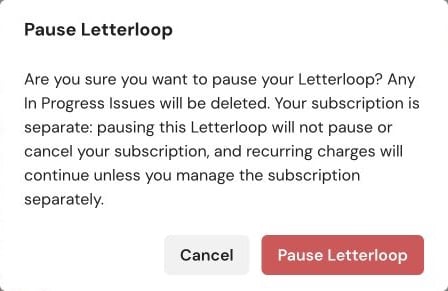
Web: The Pause Letterloop warning confirms that the In Progress Issue is deleted and subscription billing continues separately.
Open the Letterloop.
Select Settings, then Status.
Select Pause Letterloop.
Read the warning, then select Confirm.
Expected result: The Letterloop is marked Paused, its In Progress Issue is removed, and future Issues stop until an Owner or Admin resumes it.
Resuming immediately creates a new In Progress Issue, prompts Contributors to reply, sets its delivery date from the reply window saved with the Letterloop's current schedule, and calculates the next Upcoming Issue from the recurring frequency. Current Schedule choices use a seven-day reply window. Readers are not prompted to reply.
On the Dashboard, find the paused Letterloop and select Resume.
Review Confirm Resume, then select Resume Now.
Open the new In Progress Issue and review its Contributors, prompts, and delivery date.
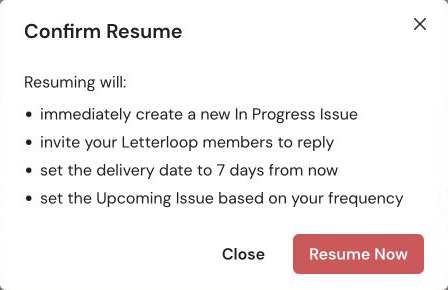
Web: Confirm Resume shows the new Issue and schedule changes before you select Resume Now.
You can also open Settings, find Letterloop Status, and select Resume Letterloop. That Settings action resumes the Letterloop immediately.
Open the paused Letterloop and select Resume now, or open Settings → Status → Resume Letterloop.
If a confirmation sheet appears, select Resume Letterloop.
Open the new In Progress Issue and review its Contributors, prompts, and delivery date.
Expected result: A new Issue starts immediately. Contributors receive the prompts, and the Dashboard and Issue card show the delivery date calculated from the saved reply window.
If an Issue reaches delivery with no saved or submitted Contributor replies, Letterloop deletes the empty Issue and pauses the Letterloop.
After the free Issues are used, Letterloop pauses when the Owner does not have the active subscription required to start another Issue.
When a subscription is required, activate or restore it before resuming.
Only an Owner or Admin can resume a Letterloop.
If the free Issues are used, confirm that the Owner's subscription is active.
Refresh once after resuming. Do not select Resume repeatedly while the new Issue is being created.
If a warning email shows an upcoming deletion date and you still cannot resume, contact Letterloop support before that date.
Pausing controls Issue creation, not subscription renewal. To stop a recurring charge, manage or cancel the subscription from the account's Subscription page or the store where it was purchased.

