Applies to: Web checkout; Lifetime access works on Web, iPhone/iPad, and Android
Who can do this: Any signed-in account can purchase Lifetime on web. It covers Letterloops that account owns; Admins, Contributors, and Readers do not need their own plan for a Letterloop its Owner already covers.
Purchase Letterloop access once, then use it on every supported platform.
The current standard web Lifetime price is $199 USD before applicable tax. It is a one-time purchase with no monthly or annual renewal. The total shown at checkout is the source of truth for currency, tax, and payment methods.
Sign in at app.letterloop.co and open Subscription.
Choose Switch to Lifetime Plan. If you are not currently subscribed, select the Lifetime plan instead.
Read the warning, then choose Continue to Lifetime Plan.
Complete the one-time checkout and wait for Letterloop to confirm Lifetime access.
Expected result: The Subscription page shows your plan as Lifetime, with no Letterloop monthly or annual renewal.
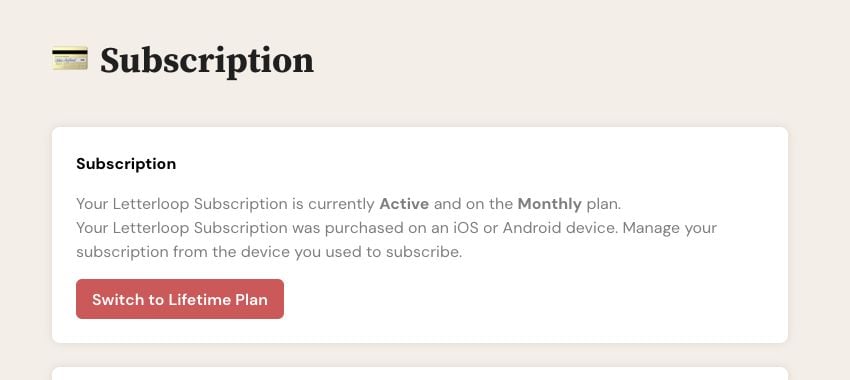
On web, choose Switch to Lifetime Plan to open the one-time checkout. A mobile-billed recurring plan is still managed through its app store.
The Lifetime plan covers all Letterloops the purchasing account owns and all members in those Letterloops. It does not transfer ownership of a Letterloop.
Paddle or Stripe on web: The Lifetime warning says Letterloop will cancel the existing recurring web subscription after the Lifetime purchase completes.
App Store or Google Play: Purchasing Lifetime on web does not cancel the store renewal. Wait until Lifetime is confirmed, then cancel the recurring plan in the same store account to avoid being charged for both.
Confirm that you are signed in on the web with the account that owns or will sponsor the Letterloops.
If the Subscription page already shows Lifetime, no purchase button is needed.
Do not assume Apple Pay or PayPal will be available. Use the payment methods shown at checkout.
Contact support if the option is still missing. Do not buy another plan or create another account to work around it.

