Switch a recurring billing interval or move to Lifetime without leaving an unwanted renewal active.
Applies to: Web, iPhone/iPad, Android
Who can do this: The person whose Letterloop account owns the subscription—usually an Owner. Admins, Contributors, and Readers cannot change another person's plan.
Open Subscription and note the current plan and where it is managed: Letterloop on web, the App Store, or Google Play.
Use the controls for the place that manages your plan. Lifetime is a separate web checkout.
Review the effective date, credit or charge, currency, and tax before confirming.
Do not start a second recurring checkout while another purchase location still shows an active renewal.
Web: Select Subscription in the Letterloop sidebar. The page shows the active plan and the controls available for that plan.
iPhone/iPad and Android: Open the user menu, select Subscription, then choose Manage Subscription. A mobile-billed plan opens its app store; a web-billed plan opens Letterloop on the web.
The web Subscription page separates device-managed recurring billing from the Lifetime checkout.
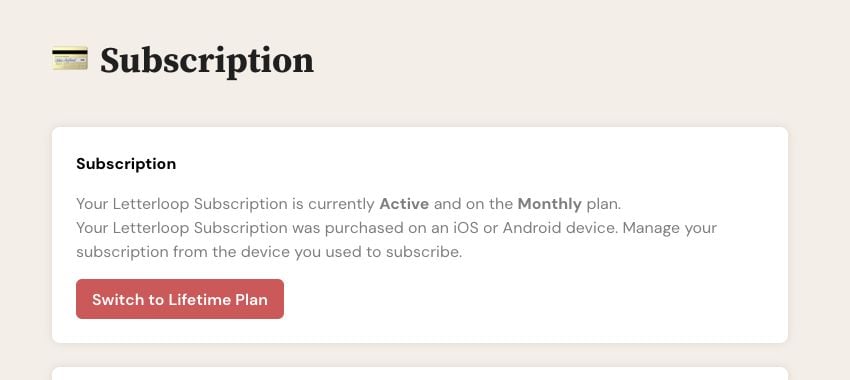
A device-billed Monthly plan is managed through its store; Switch to Lifetime Plan starts a separate web purchase.
Direct controls on web: If Subscription shows Switch to Annual Plan or Switch to Monthly Plan, choose the matching button. Letterloop applies the change immediately with proration, so the confirmation and receipt may show a charge or credit now.
Billing page on web: If Subscription shows Manage Subscription, choose it. If the billing page offers another interval, review the timing and total there before confirming.
App Store: Choose Manage Subscription, select Letterloop, choose See All Plans when it is available, then follow Apple's onscreen confirmation.
Google Play: Choose Manage Subscription. Google Play can offer billing-cycle changes only when the app and store account make another plan available. If no Letterloop interval appears, do not buy a second recurring plan; contact support first.
Expected result: The Letterloop Subscription page or store subscription screen shows the selected interval after the change is processed. Refresh Letterloop if the old interval remains visible.
On web, open Subscription and choose Switch to Lifetime Plan.
Read the warning, then choose Continue to Lifetime Plan.
Complete the one-time checkout.
Wait until Letterloop shows Lifetime access before changing the old renewal.
Web-billed recurring plan: Letterloop normally cancels the existing web recurring plan after Lifetime is confirmed. Verify that only Lifetime remains active.
App Store or Google Play: Cancel the store renewal yourself after Lifetime is confirmed. A web Lifetime purchase cannot cancel an Apple or Google subscription.
Expected result: Letterloop shows Lifetime access and no unwanted recurring renewal remains.
Confirm that you signed in with the Letterloop account that owns the subscription.
For an App Store or Google Play plan, use the same Apple Account or Google Account that made the purchase.
If your billing page or app store does not offer another interval, contact Letterloop support before starting a separate recurring checkout.
If the change is confirmed but Letterloop still shows the old plan, refresh the page or app and follow Subscription not showing as active.
If two recurring renewals appear active, contact support before purchasing or switching again.