Applies to: Web, iPhone/iPad, Android
Who can do this: Any current member—Owner, Admin, Contributor, or Reader—when comments are enabled for the Letterloop.
Use comments to discuss a delivered Issue without leaving Letterloop.
Comments appear on delivered Issues. An Owner or Admin can open Settings → Commenting and enable them for the Letterloop.
You must open the Issue as a signed-in current member to participate. A generic public Issue share-link viewer can read the shared Issue but cannot comment or react.
Open a delivered Issue.
Select Comments for the whole Issue, or choose the speech-bubble comment control beside a reply or poll.
Select the relevant thread, or use the general Issue thread.
Enter your comment in Share a comment (type @ for mentions). You can also attach finished photo or video uploads and use the bold or italic controls.
Select Share.
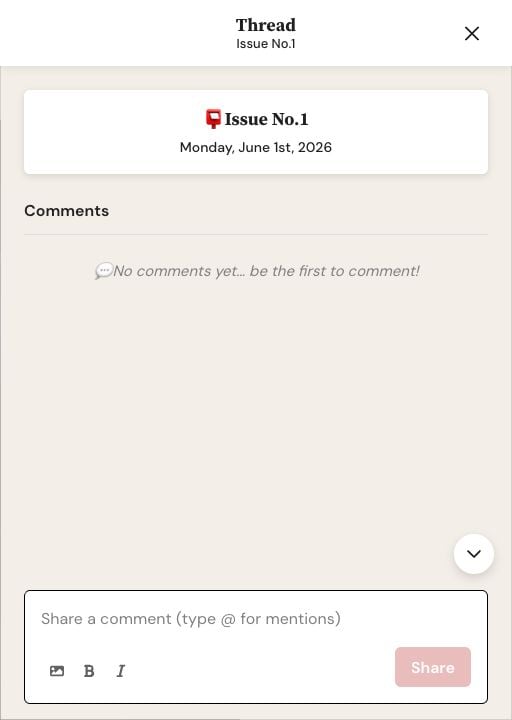
On web, the Thread drawer keeps the comment field, media and formatting controls, and Share button together.
Open a delivered Issue.
Open Comments, or choose the comment control beside a reply or poll.
Choose a thread, then select Share a comment... to open the composer.
Write the comment and add a photo or video if useful.
On iPhone or iPad, select the arrow labeled Share. On Android, select the Send arrow.
Expected result: The comment appears in the selected thread. On Android, Letterloop scrolls to the comment you just posted; when you return to the comments list, it restores your previous position even if recent activity reordered the list. If Android does not do this, update Letterloop from Google Play and reopen the Issue. Other members may receive email or push notifications according to their comment notification settings.
Type @ and begin the member's name, then choose the intended person from the suggestions. The mention is saved with the comment so Letterloop can identify the recipient. Whether they receive email or push depends on their comment notification settings and channels.
Open a comment's actions and select Reply. Letterloop adds the original comment as a quote in your draft.
Use Edit Comment to change the text of your own comment.
Before deleting: Delete Comment permanently removes your comment and its reactions. This cannot be undone.
A comment can contain text, finished media uploads, or both.
If comment controls are missing, confirm that the Issue is delivered and ask an Owner or Admin to check Settings → Commenting.
If Share or Send stays unavailable, confirm you are signed in as a current member, add text, or wait for every media upload to finish processing.
If mention suggestions do not appear, type @ immediately followed by the member's name.
If a submitted comment does not appear, reopen the thread and refresh the Issue once. Contact support if it is still missing.
Comments can trigger email and push notifications and may quote earlier content. Do not include passwords, payment details, or private information that the Letterloop group should not retain.

