Applies to: Web, iPhone/iPad, Android
Who can do this: Owner or Admin
Who can reply: Contributors. Readers cannot reply to Sections. Admin Only can further restrict a Section to the Owner and Admins who are also Contributors.
A Section is an optional content area in an Issue outside the normal question list. Sections can invite a different kind of contribution, such as a group update, a photo wall, music picks, or messages for an event.
The Type menu has three choices:
Standard — a text response followed by an inline image or video.
Photo Wall — images and videos displayed edge-to-edge with a required single-line caption.
Music — songs found through Spotify with an optional single-line caption.
Events are not a fourth Type option. An Event that falls within an Issue can receive its own Standard-style Section for messages, photos, and videos.
Reusable Sections belong to the Letterloop. Selected Sections are copied into an Issue when it starts. An Owner or Admin can also add or edit a Section while customizing an upcoming or in-progress Issue.
Upcoming Issue: Section changes also apply to future Issues of the Letterloop.
In-progress Issue: Section changes apply only to that Issue. Make the same change in the upcoming Issue when it should carry forward.
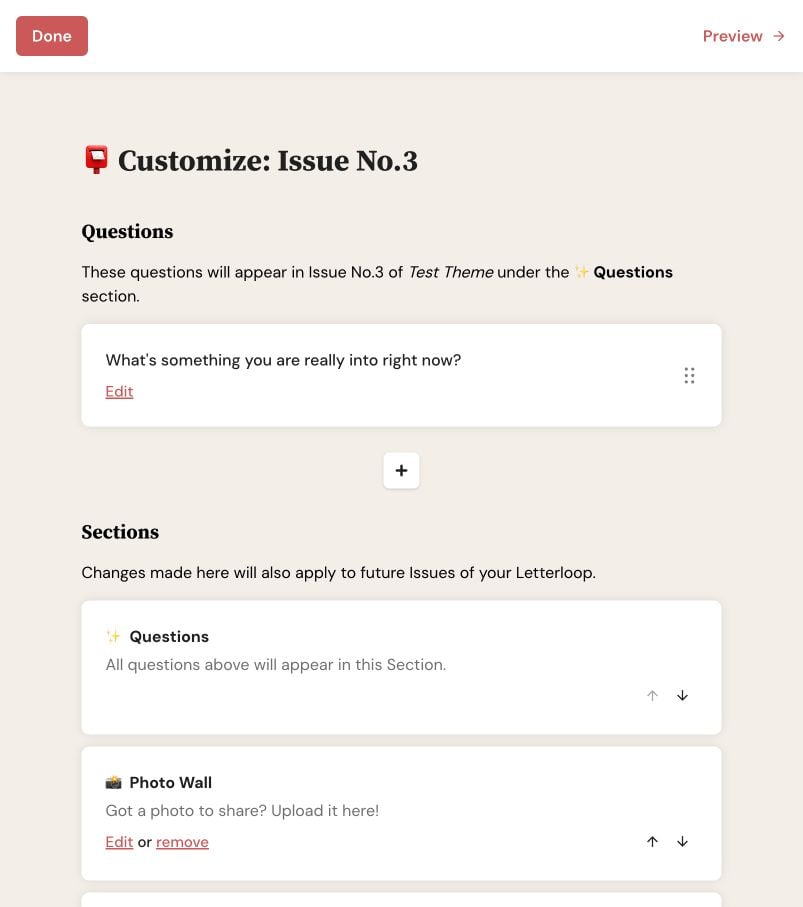
In an upcoming Issue, use the Sections list to review, edit, remove, or reorder each Section; those changes also apply to future Issues.
Title and emoji appear in the reply form and final Issue.
Description guides replies in the reply form and does not appear in the final Issue.
Type determines the reply controls and final layout.
Admin Only narrows reply access to the Owner and Admins who are Contributors. Leave it off when every Contributor should be able to reply. Readers cannot reply either way.
Order controls whether a Section appears before or after Questions and where it sits among other Sections.
Eligible Contributors see the Section in the reply form. Readers do not see a reply form for the Issue. The delivered Issue shows submitted content in the selected layout and order.
Each extra Section adds another task for contributors. Use a small number with clear instructions, preview the Issue order, and remove old Sections from an upcoming Issue when they no longer fit.

