Applies to: Web, iPhone/iPad, Android
Who can do this: Owners and Admins can manage all events and birthday settings. Contributors can add and edit their own non-automatic events only when Let all members create and edit events is on. Readers cannot create events.
Use Events to add a one-time milestone or a recurring birthday. When an event date belongs to an Issue's event range, Letterloop adds it as a Section so Contributors can leave messages and media.
From the Dashboard, open the Letterloop.
Select Events in the Letterloop navigation.
Open the Letterloop.
Select Events.
Under Upcoming Events, select + Add Event.
Enter a Title, Description, and Date. The date must be today or later.
Choose Type: General for a one-time milestone, or Birthday for an annual event. A Birthday event also requires a Member.
Select the icon beside Title if you want to change the emoji.
Select Save.
Expected result: Letterloop confirms Event added and shows the event under Upcoming Events.
If the event belongs to an in-progress Issue, Letterloop shows Update in-progress issue? before saving. Review whether the event Section will be added, removed, or moved, then select Continue only if that live change is correct. Contributors writing replies will see the change.
Letterloop places an event in the Issue whose event window includes the event date. Use the Issue preview to confirm where it will appear.
Web: Open the Letterloop and choose Submit Question as a Contributor, or Customize as an Owner or Admin. Choose Preview. Events in that Issue's window appear under 🎉 Events.
iPhone/iPad and Android: Owner and Admin Issue previews include events. Contributor previews currently show questions and regular Sections; Contributors see the Event Section when the Issue opens for replies.
Expected result: A visible event inside the Issue window appears in date order under 🎉 Events in supported previews. Hidden events and dates outside that window do not appear.
Under Upcoming Events, open the event's actions menu (•••).
Select Edit to change the event, or Delete to remove it.
Owners and Admins can manage every event. An eligible Contributor can manage only a non-automatic event they created.
Before deleting: If the event is already in an in-progress Issue, deleting it removes that reply Section. Contributors writing replies will no longer see it. Review the warning, then select Delete only if that is intended.
Each member can open their Letterloop Profile, add a Birthday, and select Save. Letterloop stores only the month and day, not the birth year.
Birthday events repeat annually. After the date passes, Letterloop moves the event to its next annual occurrence. Replies already collected in an in-progress or delivered Issue stay with that Issue.
A recurring Birthday event must be linked to an existing Member of that Letterloop. To remember a child, friend, or anyone else who is not a Member, create a General event for the next date instead. General events are one-time, so add a new event for a future year when needed.
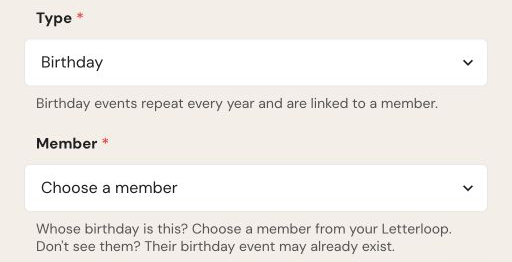
The Birthday type requires an existing Letterloop Member; choose General for a child, friend, or other non-member.
Owners and Admins can use the Birthdays area on Events to control automatic birthday events:
Include automatically controls whether Letterloop adds automatic birthday events to Issues for members who saved a birthday. Turning it off keeps saved birthdays on member profiles.
Emoji sets the emoji for automatic birthday events.
Description uses the default birthday message or a custom description.
Use Prompt Members > Collect missing birthdays > Send to ask Contributors who have not added a birthday. Use Invite contributors to create events > Send to remind Contributors about the shared event calendar.
Owners and Admins can turn Settings > Let all members create and edit events on or off.
When it is on, Contributors can create events and edit their own non-automatic events.
When it is off, only Owners and Admins can manage events.
Readers remain Readers and cannot create events in either state.
+ Add Event is missing: You may be a Reader, or an Owner/Admin may have turned off Let all members create and edit events.
Save is unavailable: Complete Title, Description, and Date. A Birthday event also requires a Member.
The date is rejected: Events must be today or later. Past events do not appear under Upcoming Events.
A birthday is missing: Ask the member to save their Birthday in Profile, then confirm Include automatically is on.
The event is in the wrong Issue: Edit its Date, review any Update in-progress issue? warning, and check the upcoming or in-progress Issue customization.
A birthday may be duplicated: Check Upcoming Events before creating another birthday event for the same member.

