Open a delivered Issue, focus on one member's replies, or change the response order without changing anyone else's view.
Applies to: Web, iPhone/iPad, Android
Who can do this: Current Letterloop Owners, Admins, Contributors, and Readers.
The Past Issues list is ordered with the newest Issue first. Letterloop does not have a separate sort control for the Past Issues cards.
Open the Letterloop and choose Issues.
Under Past Issues, find the Issue number or name you want.
Choose View Issue →. You can also open the card's Options menu and choose 👀 View Issue.
Open the Letterloop and choose Issues.
Under Past Issues, choose View Issue → on iPhone/iPad or View Issue on Android.
Expected result: The delivered Issue opens with its saved questions, Sections, polls, and replies.
Open the delivered Issue's filter control. On web, choose Filter and Sort in the upper-right corner. On iPhone/iPad or Android, choose the filter icon to open Filter & Sort.
Under Filter by Member, choose a person. Only members with replies in that Issue appear.
Choose All Members to restore the complete Issue.
Expected result: Letterloop shows that person's question, Section, and poll responses while the filter is active.
Under Sort Responses, choose Default, A → Z, or Z → A. The alphabetical options sort member responses by member name inside each question or Section. Sorting changes only your current view; it does not rewrite the delivered Issue or another member's view.
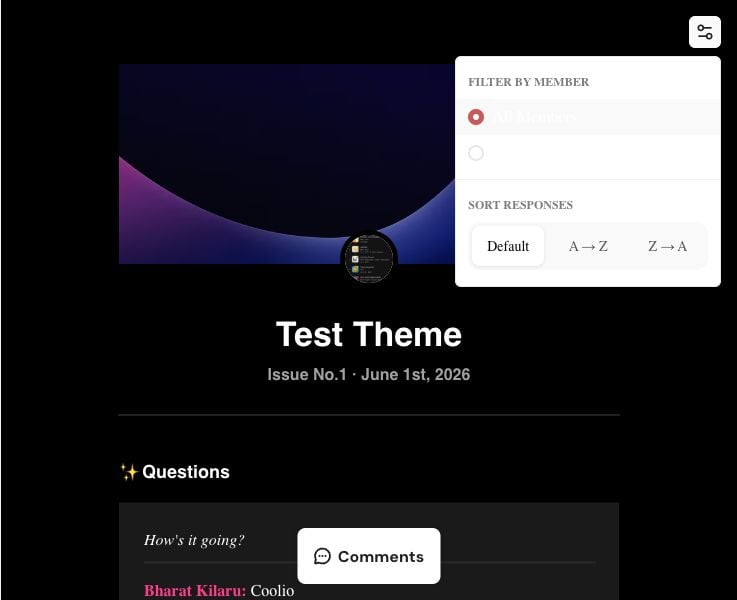
Open the Filter and Sort control to focus on one member or reorder responses by member name.
The control appears only when the Issue uses Letterloop's current Issue format and contains a question or Section reply from at least one member. On web, an older-format Issue opens in the legacy reader without Filter & Sort. On iPhone/iPad or Android, choose View on web → to read that Issue in your browser.
Choose All Members or Clear All Filters if a filter hides the responses you expected.
If a delivered Issue is missing, confirm that you signed in with the email attached to its Letterloop membership.
React when you are signed in as a current Member, and open comments when Commenting is enabled for the Letterloop.
Browse its photos and video with the Letterloop Album.
Download a PDF for an offline snapshot.
Share the Issue by email, or use an Admin share link when appropriate.
Past Issues are available to current Letterloop members. A valid Issue share link can expose the shared content to someone outside the roster, so treat share links and forwarded Issue emails as private.

