Browse all photos and videos from delivered Issues in one Letterloop, then open the source Issue when you need the surrounding reply.
Applies to: Web, iPhone/iPad, Android
Who can do this: Any current member: Owner, Admin, Contributor, or Reader.
The Album brings together photos and videos attached to replies in delivered Issues for the selected Letterloop. A video can appear while it is still processing, before playback is ready.
The Album does not include theme or header images, comment attachments, or media from a person who is no longer a member of the Letterloop.
Open the Letterloop and choose Album.
Expected result: The gallery opens with the newest items first, grouped by date.
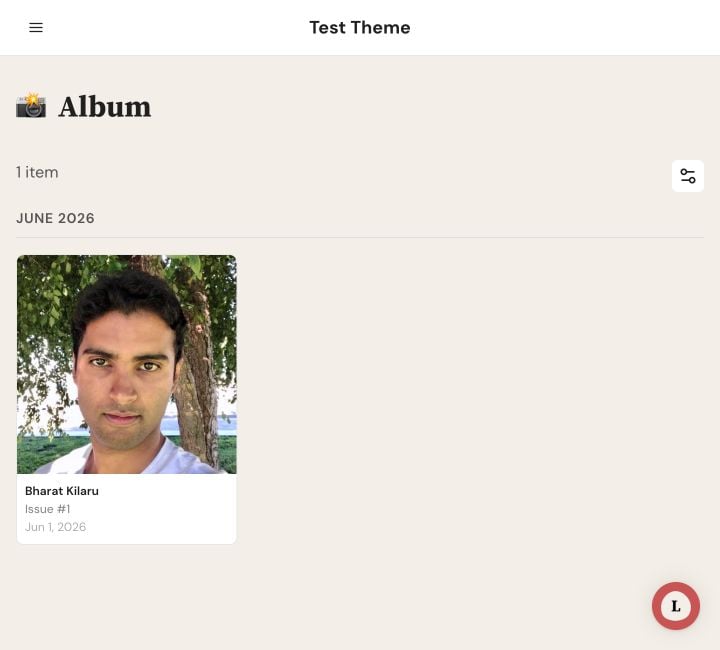
The Album groups delivered media by date. Choose the filter-and-sort icon to narrow or regroup the gallery.
Choose a photo or video to open the fullscreen viewer.
On web, use the left and right arrow keys to move between items. On iPhone/iPad or Android, swipe horizontally.
Choose View in Issue to open the reply in its source Issue. Web opens the Issue in a new tab; the mobile apps navigate to the Issue.
Choose Close to return to the gallery.
The available controls differ by platform.
The web Album is for browsing. It does not offer a dedicated Album download or share control. Use View in Issue to return to the original reply, or open the Letterloop app on iPhone, iPad, or Android to use mobile share and save controls.
Open a photo or video in the Album.
Choose the share icon in the top-right corner.
Use the iOS share sheet to send the item or save a copy. The available destinations depend on iOS and the apps installed on your device.
Expected result: The selected destination opens, or the saved copy appears in Photos.
Open a photo or video in the Album.
Choose the share icon in the top-right corner to send the item through a compatible app.
To save a copy directly, touch and hold the media, choose Save, and allow storage access if Android requests it.
Expected result: The item opens in the selected app, or the saved copy appears in your device gallery.
Choose the filter-and-sort icon to open Filter & Sort.
Filter by member, delivered Issue, or a custom date range.
Sort with Newest or Oldest.
Group the gallery by Date or Issue.
If no items match, clear the filters to show the full Album again.
Album is a browsing view across the Letterloop's delivered media.
A delivered Issue preserves the questions and replies around that media.
A Memento is an image created in the iPhone/iPad or Android app for saving or sharing.
Android: Update Letterloop from Google Play, then open the item again. Version 1.5.1107 includes the Album selection fix.
iPhone/iPad 1.53: If Group By is set to Issue and a different item opens, return to Filter & Sort, set Group By to Date, and select the item again. You can also open the delivered Issue and select the photo or video there.
Contact Letterloop support if the wrong item still opens after those steps.
Clear every filter and confirm that the source Issue was delivered.
If a video is still processing, wait for it to finish and refresh the Album.
Check that the photo or video still appears in the delivered Issue.
Remember that comment attachments, branding images, and media from removed members are excluded.
Refresh the Album after a late reply or newly completed video.
Contact support if media appears in the delivered Issue but not in the unfiltered Album.

