Create a private group newsletter, choose how members participate, and start Issue No. 1 in one setup flow.
Applies to: Web, iPhone/iPad, Android
Who can do this: Any signed-in Letterloop user. The creator becomes the Owner, an Admin, and a Contributor.
From the Dashboard, choose Create a Letterloop. If this is your first one, choose Create your first Letterloop.
From Home, choose Create a Letterloop.
Under What should we call your Letterloop?, enter a recognizable group name.
Under Which experience do you want?, choose:
Group when members should contribute replies to a collaborative Issue.
From You when you will write the Issue and everyone else should receive it as a Reader.
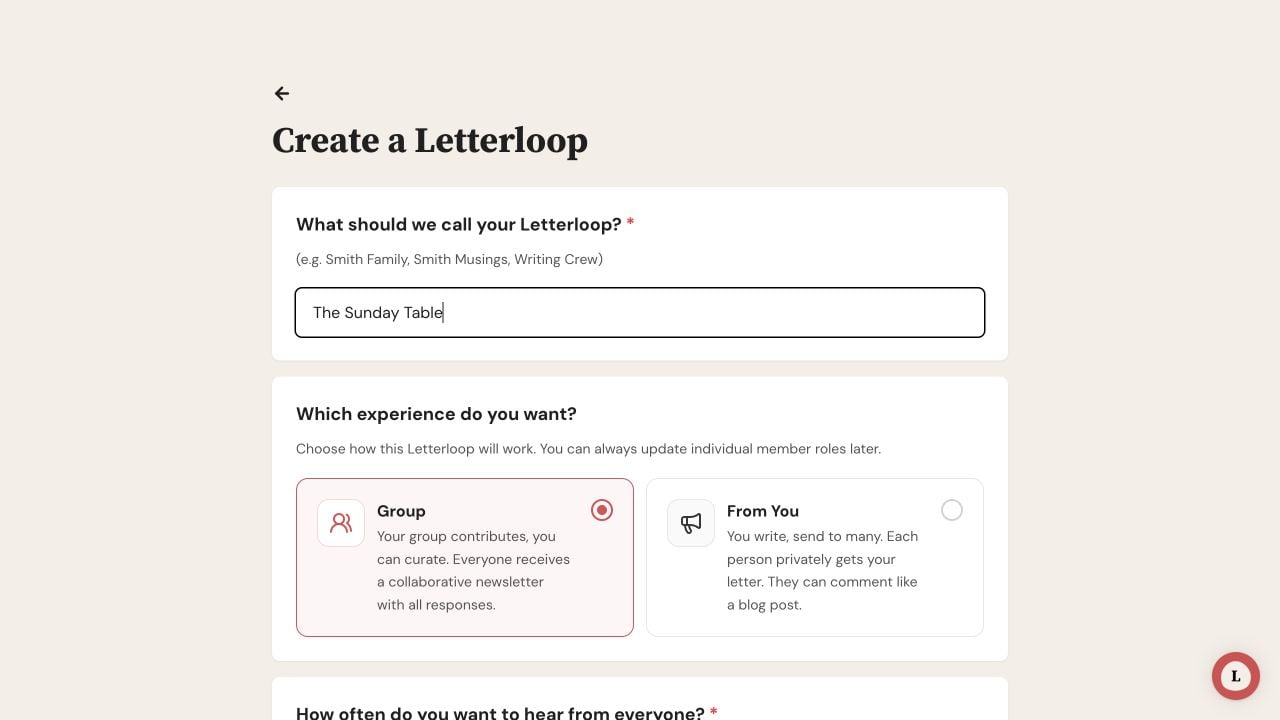
Name the Letterloop, then choose Group or From You based on how members should participate.
Choose the recurring frequency. The choices are Every month, Every two weeks, and Every quarter; monthly is marked as recommended.
The creation form does not have a separate reply-window control. Issue No. 1 starts when creation finishes and is scheduled for delivery seven days later. The frequency controls the cadence for later Issues.
Under What sections would you like to include in your Letterloop?, keep or remove the suggested Sections. Use Add Your Own Section if needed.
Under What questions would you like for Issue No.1?, keep or remove the suggested questions. Use Add Your Own Question to write one yourself.
Choose Preview your design if you want to review the Issue before creating the Letterloop.
You can edit the questions, Sections, schedule, and theme after creation.
Sections are optional. If you remove every question and add none of your own, Letterloop adds “How's it going?” so Issue No. 1 still has a prompt.
You are already included as the Owner and a Contributor. Adding anyone else during setup is optional. In Group, choose Add Member and set each person as a Contributor or Reader. New members default to Contributor.
In From You, choose Add Reader. People you add join as Readers; you remain the Contributor.
Review Add a personal note to include in the email invitation. A non-empty note is required.
Emails are sent after creation finishes. You can also add people later from Members.
Review the name, experience, frequency, first-Issue content, people, and invitation note.
Choose Finish & Start Your Letterloop.
On web, wait for Your Letterloop is ready!, then choose See my Letterloop. On iPhone/iPad and Android, wait for Your Letterloop is ready!, then choose See my Letterloop →.
Expected result: Letterloop creates the group, makes you its Owner and an Admin, starts Issue No. 1, and sends the appropriate emails to the people you added. Issue No. 1 is scheduled for delivery seven days after creation.
A Letterloop name and personal invitation note are required.
If questions or Sections are still loading, wait for them to appear before submitting.
Check your connection and confirm that you are still signed in, then try once more.
Before starting over, return to Home or the Dashboard and check whether the Letterloop was already created.
If the Letterloop exists but an invitation did not arrive, resend it from Members instead of creating another Letterloop.

