Applies to: Web, iPhone/iPad, Android, Email
Who this is for: An invited Contributor or Reader. Some recovery steps require the Letterloop Owner or an Admin.
A missing Letterloop usually means the signed-in account does not match the email on the member record. Work through these checks before creating another account or replacement Letterloop.
Find the email address that received the Letterloop invitation or a delivered Issue.
Sign out of Letterloop.
Sign back in with the email that was invited, or use the same Google or Apple sign-in provider you used before. See the Gmail exception below if the addresses differ only by periods.
Reopen the newest invitation or return to your Letterloops list.
Expected result: The Letterloop appears in your list without creating a second account.
Gmail sends dotted and undotted versions of the same address to one mailbox. On the web, Letterloop now recognizes those versions as the same mailbox when it finds an existing membership. For example, [email protected] and [email protected] can open the same Letterloop. This exception applies to periods in Gmail addresses; do not assume another email provider ignores periods.
Open Letterloop on the web and sign in to the account you already use.
Return to your Letterloops list. Do not create another account or ask an Owner or Admin to add a duplicate member just to change the periods.
If the Letterloop appears on the web but remains missing in the iPhone, iPad, or Android app, keep using the web version, install the latest mobile update, and contact support with both address spellings.
Expected result: The web app shows the existing Letterloop without creating a second account or member record.
If you chose Hide My Email, your Letterloop account may use an Apple Private Relay address ending in @privaterelay.appleid.com.
Sign in with the same Apple account you used when you joined Letterloop.
Ask the Owner or an Admin to compare the exact email shown for you in Members.
If the addresses differ, use the choice shown by Letterloop: sign out to keep using your actual email, or continue with Private Relay and ask the Owner or an Admin to add the displayed relay address again. If either address already has a Letterloop account or you need to preserve earlier replies, contact support before changing the membership.
Open the Letterloop and choose Members.
Find your member record and confirm its email matches the account you are using. On the web, the dotted Gmail exception above also counts as a match.
If the email is correct, resend the invitation:
On web, open Options and choose Resend Invitation.
On Android, open the member’s ellipsis menu and choose Resend Invite.
On iPhone/iPad, open the member’s ellipsis menu and choose Resend Invite.
If you joined by link, ask for the correct role-specific link and keep it private.
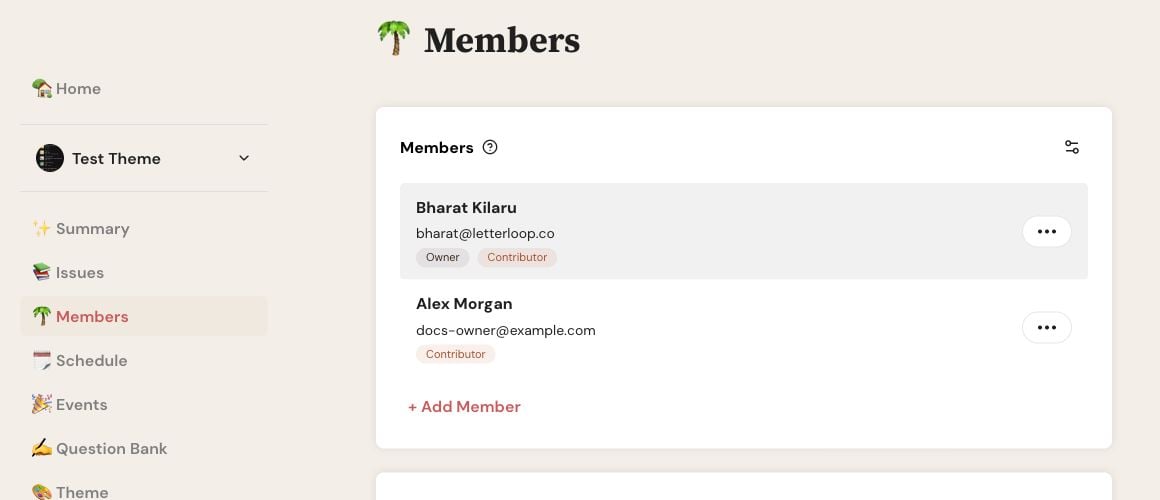
On web, open the three-dot Options button beside the person whose invitation you want to resend.
iPhone/iPad recovery: If the ellipsis menu does not open, use Letterloop on the web. Open the same Letterloop, choose Members, open the person’s Options, and choose Resend Invitation. Android is not affected by this iOS issue.
Expected result: Letterloop sends a new invitation email to the address on that member record. The newest invitation should open the same membership without creating a second member.
A Contributor can submit replies. A Reader receives delivered Issues but does not submit replies. Do not solve a role or account mismatch by sharing another person’s login.
Search the inbox for Letterloop and check spam, junk, and promotions folders.
Confirm the Owner or Admin used the same email you are checking.
Open the newest invitation after it is resent.
Follow the additional delivery checks in Not receiving Letterloop emails.
Contact support when the member email and signed-in account match but the Letterloop still does not appear. Include the account email, Letterloop name, platform, and what you already tried. Do not include an invite link, magic link, authentication code, or password.

