Use a private reply link to add or edit your response after an Issue is delivered, when Late Submissions is enabled.
Applies to: Web, iPhone/iPad, Android
Who can do this: Contributors can submit late replies. Owners and Admins enable Late Submissions and can provide each Contributor's unique reply link. Readers cannot reply.
An Owner or Admin must enable this setting before Contributors can submit or edit replies after delivery.
Open the Letterloop and choose Settings in the sidebar.
Find Late Submissions and turn the setting to Enabled.
On Home, open the Letterloop and choose Settings.
Choose Late Submissions, then turn Enabled on.
Start with your private reply link. After delivery, View Issue opens the delivered Issue—it does not reopen the reply form.
Open the unique reply link that belongs to your Letterloop membership. On iPhone/iPad or Android, the link can open the Letterloop app; otherwise it opens the web reply form.
If prompted, sign in with the email address connected to that membership.
Complete or edit the questions and Sections that still apply.
Wait for every attached photo or video to finish processing.
Submit the reply: choose Share Your Reply or Save Edits on web; on iPhone/iPad, tap the paper-plane send button on iOS 26 or choose Share Reply or Submit Edits on earlier supported iOS versions; on Android, tap the Send button.
Check for the confirmation that your reply was saved.
On web, open Issues, find the delivered Issue, choose Options, then Get reply links. On iPhone/iPad or Android, open Issues, find the delivered Issue, open its action menu, then choose Get reply links. Copy the link for the person who needs to reply, send it only to that person, and do not post it publicly. Each link opens one member's reply form.
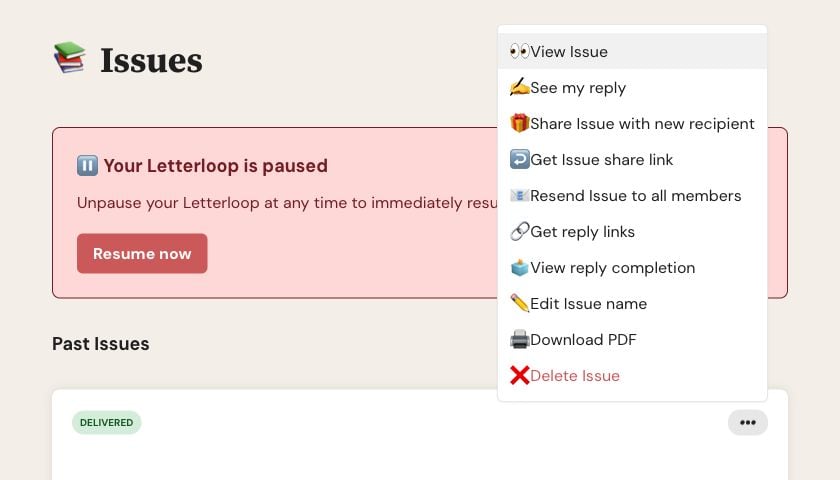
On web, open a delivered Issue's Options menu and choose Get reply links.
The saved late response appears in the live delivered-Issue view.
Owners and Admins who enabled Late Reply alerts can receive an email or push notification.
The original delivered email does not change.
An existing PDF does not change. Generate the PDF again if it should include the late response.
If you see Responses Closed, ask an Owner or Admin to confirm that Late Submissions is Enabled and that you are a Contributor.
If the link shows another person's name, stop and ask for your own unique link. Do not enter or submit a reply for another member.
If the setting, role, and link are correct but the form still stays closed, contact support with the Letterloop name, Issue number, platform, and your account email. Do not send the private reply link unless support asks for it.

